
Inspiring
May 4, 2017
Question

Custom Captions? Need transparency!

  • May 4, 2017
  • 1 reply
  • 1810 views

I wanted to create cutom captions for labelling images, but unfortunately I did not get them completely transparent.

This is what I want: a short, thick vertical line, which must keep it´s size, a 2px horizontal line which must be scalable, underneath text in variable size.
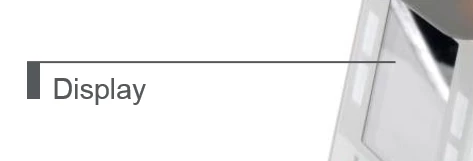
And this is what I get in Captivate:
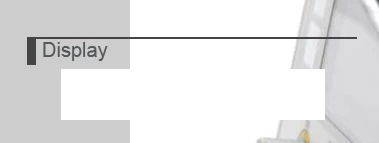

I´ve added a grey background color to the project, so you can see that the caption box ist not completely transparent.

My problem is, no matter what color the upper first left pixel has and not matter which color is set for any other pixel (except the darkgrey lines), there´s always a opaque area in the center of the caption box. This might be OK, if the label is only a single word or text line as shown, but it will get difficult with multiple lines in the label.

How can I get a transparent label? Or is it possible to create this with a custom smartshape instead of a caption?

I´m working with CPT 9, publishing in HTML5, responsive project.

This topic has been closed for replies.

1 reply

laurieb4674
Known Participant
May 4, 2017

Is the white block under the word Display what you are referring to as “not completely transparent”?
It almost looks like there is another element in the that spot. Try Ctrl+a to reveal all elements on the screen to be sure this isn't the case.
To construct what you want, I would use the shapes for the two lines and another (or a Text Caption) for the label. When all are positioned, then Group the 3 as one, identifiable unit. The Group can be copy/pasted to make additional labels of the same style, then just edit the text in each copy and drag it into its correct position. The Group name can be used in Actions such as show/hide.

Inspiring
May 4, 2017

Yes, that white block is what has to be transparent! There are no other objects than the text caption and the image.

With using custom captions I wanted to avoid working with three objects per label and therefore make it easier for my workgroup to create labeled images. Also the size of just one object in a responsive project is more easy to handle than a group of three ...

Captiv8r
Legend
May 4, 2017

Can you share a screen capture of what the image looks like when you are editing it before you add it to Captivate as a Caption?