Inspiring
March 10, 2023
Answered

Custom Closed Captioining is Moving to Next Slide at End of Timeline

  • March 10, 2023
  • 1 reply
  • 838 views

Good Morning!


Another custom CC question.

  1.  When the slide reaches the end of the timeline.
  2. And if the learners selects the CC button.
  3. The slide moves to the next slide.


I am hoping there is an "unadvertsied" system variable I could use which will:

  • when you reach end of slide timeline closed captioining button is disabled for that slide.

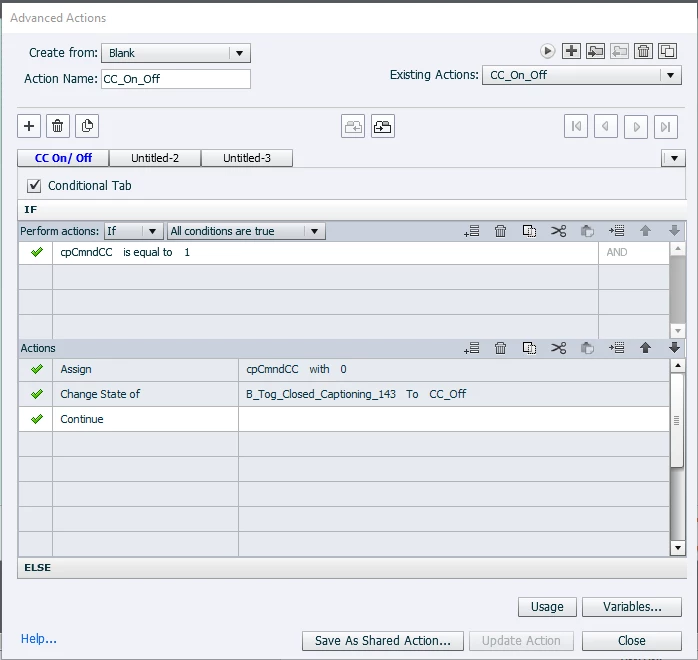
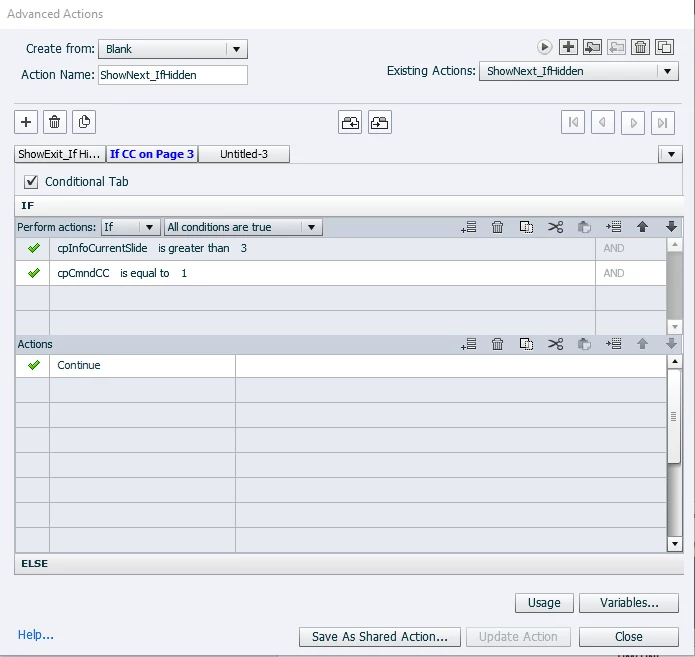
Below is what I have done to date:
Custom Button Advanced Action
 

Every Slide


    This topic has been closed for replies.
    Correct answer Lilybiri

    Please, add the Advanced Interaction panel.

    What is the use of disabling a button at the last frame since the playhead will go immediately to the next frame? Or do you want to disable the CC toggle button for the next slide?

    The On Exit event of a slide is simple not to be trusted.

    1 reply

    Lilybiri
    LilybiriCorrect answer
    Legend
    March 10, 2023

    Please, add the Advanced Interaction panel.

    What is the use of disabling a button at the last frame since the playhead will go immediately to the next frame? Or do you want to disable the CC toggle button for the next slide?

    The On Exit event of a slide is simple not to be trusted.

    Inspiring
    March 10, 2023

    Advanced Interaction Panel


    What is the use of disabling a button at the last frame since the playhead will go immediately to the next frame?

    - I am still learning. So a  little clumsy with terms and ideas 😉
    - I do not think my team would like that at the end of slide, if the custom CC button is clicked accidently that it acts as a next button. I am just trying to anticipate conerns/ questions. If this is just what this custom CC button does, and I explain it "a Captivate expert" excplained this is how the custom CC botton works, I am good with that too. 🙂
    I just find it strange that at the end of the slide timeline the CC button acts as a next button when selected.


    Or do you want to disable the CC toggle button for the next slide?

    - I am not looking to disable the toggle on the next slide


    On Exit event of a slide is simple not to be trusted.

    - I don't understand


    Lilybiri
    Legend
    March 10, 2023

    It is all about the Timeline and the pausing points. 

    Sorry but I cannot see which actions are triggered by which events in the Advanced Interaction panel, because the column On Success has not been expanded. I see that you have a lot of Pause On Exit, bad idea IMO.

    The On Exit event happens after the last frame of the slide, and that can lead to issues. If you have interactive objects with pausing points on the slide, it is probably that the frames after the pausing point will never be visited, which means that the action will never be done.

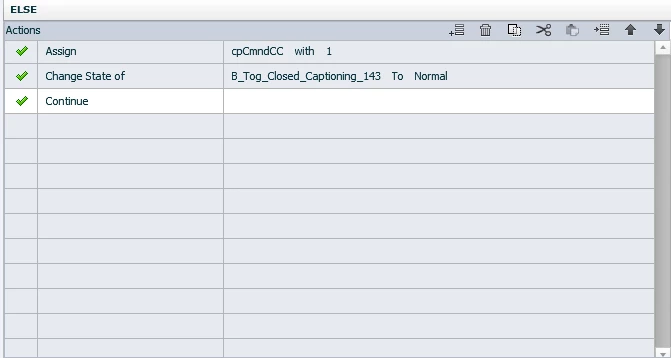
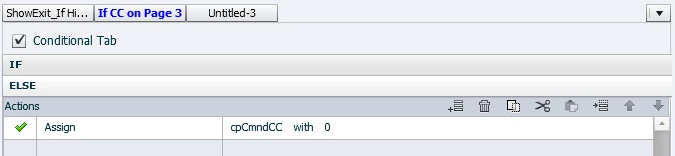
    Why would a CC button act as a Next button? You hae added Continue in the THEN/ELSE parts og the toggle action which shouldn't be done and which causes any Pause to be overridden. I hope you did take out the pausing  point for the CC button. I remember pointing you already to my blog post about Toggle buttons with a shared action but you kept your setup.

    If you want all slides to pause at the end - which is a typical presentation (PPT) not an eLearning features - it is much better to put a shape button with 'No action' on the main master slide, make it invisible by setting Opacity and Stroke to 0. Each slide will now pause at the end, whatever its duration. At the end now means on the last frame, not after the last frame. Much more trustworthy than your On Exit action set to Pause.

    My reflection about pausing each slide being a presentation technique: presentations are given and controlled by a presenter. eLearning should be controlled by the learner. Much better to offer them custom navigation buttons (which mostly can also be put on the master slides) and take out the playbar which is only really user friendly for complete linear projects.


    If there is one blog post you really need to read it is this one:

    https://blog.lilybiri.com/pausing-captivates-timeline

    It has over 70K views and it deserves this high number.