Inspiring
May 15, 2015
Answered

Custom effect in Advanced actions switches back to default

  • May 15, 2015
  • 1 reply
  • 535 views

The old custom effects and advanced actions...

I'm trying to apply a custom effect to an object:
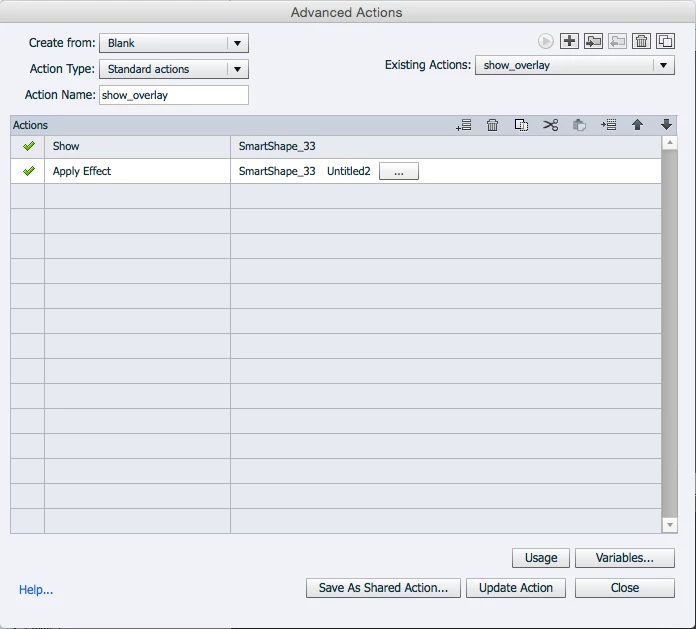
But when I update the action, it changes back to the default:
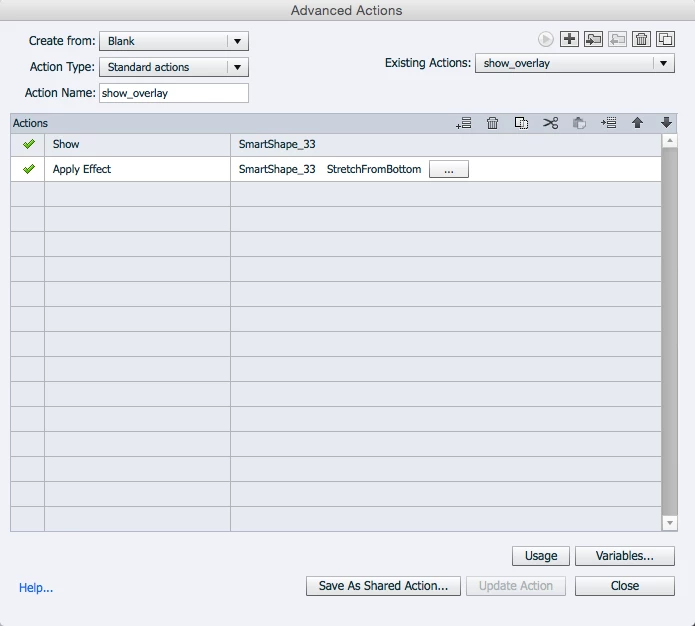
I tried to switch the order as suggested by jmblackman in this thread: https://forums.adobe.com/thread/950517?q=advanced%20action%20custom%20effect

But then the object will just appear without the effect.

The customization I made was the duration of the effect. So I'm not really sure if it really changes to the default effect or that the duration of a custom effect is set at 1 second as I remember reading somewhere.

Is there anyone out there who mastered this part of Captivate?

I'm using Captivate 8 by the way.

Thanks

    This topic has been closed for replies.
    Correct answer Lilybiri

    It is 0,7 second.

    I did apply it to a random object on the slide. Otherwise it will not show up in the custom folder in the advanced actions interface.

    It worked as it should then. I deleted it afterwards.


    Indeed, that is the cumbersome work flow to have it show up in the list. But 0,7secs will not work, too short. I really hope one day those limitations for effects by advanced actions will be done with.

    1 reply

    Lilybiri
    Legend
    May 15, 2015

    What did you customize in that effect? I use custom effects a lot, but it is a bit tricky when applied by advanced actions. Examples here:

    Reset Effects in Captivate 6 - Captivate blog

    B-aceAuthor
    Inspiring
    May 15, 2015

    Hi Lilybiri, I just changed the duration of the effect since you can't do that through the advanced actions.

    Lilybiri
    Legend
    May 15, 2015

    How long is it? For most effects you cannot get below a certain limit for the duration.

    Did you apply the custom effect first time-based after creation?