isaac_s1
Known Participant
June 22, 2017
Answered

Custom Image won't apply to image button

  • June 22, 2017
  • 1 reply
  • 881 views

This is an odd one.

I made a custom png for a next arrow in illustrator, nothing weird about the export preferences. I made a button in Captivate, then selected "image button" in the properties window. When I browsed for and selected my custom icon...nothing happened, and the default button image remained. This has never happened to me before. Later on in the course I used custom image buttons (also pngs) just fine, so I'm at a loss to explain what's going on.

THINGS I HAVE TRIED:

- Exporting as png-8

- Restarting the course

- Rebooting my computer

- Cursing at my monitor

Heeeelllllppppp

This topic has been closed for replies.
Correct answer Lilybiri

I did read the blog, thanks for the information. The benefits seem clear to me, mostly because I have to delete old assets with the same name from the library every time I need to update so Adobe doesn't cache them and refuse to accept the new ones. So long as the visual quality isn't impacted (that's the highest priority for me), I don't see why not.
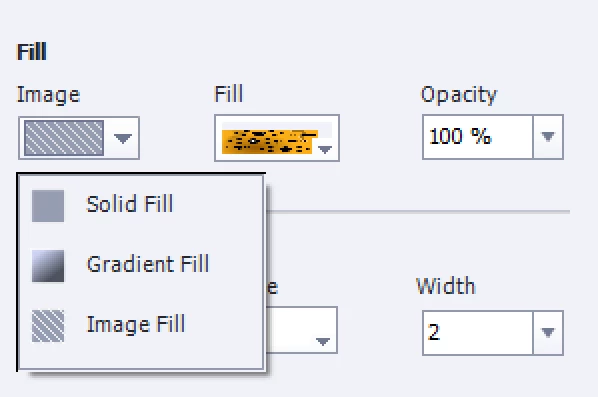
Again, I'm using CP9, so per your assertion it should be working fine, but fill options for the smart shape (currently using a rectangle) do not include an option to fill with an image.


It is mentioned in that blog, but here is another screenshot:

1 reply

Lilybiri
Legend
June 22, 2017

Maybe this could help, don't use the old image button but a filled shape button:

Turn an Image into a Button - Captivate blog

isaac_s1
isaac_s1Author
Known Participant
June 22, 2017

Hey thanks for the link. Unfortunately I do a lot of custom work and it isn't exactly feasible for me to make a shape that exactly matches the outline of the icon I made. Even then, this workflow seems messy and all too easy to deform your image.

Lilybiri
Legend
June 22, 2017

Work flow for the old type of image buttons is a lot more cumbersome and there is no way to edit the button in Captivate.

http://www.infosemantics.com.au/adobe-captivate/create-custom-image-buttons

Be aware that the old button types have a lot of limitations: cannot be used on master slides, cannot be timed for the rest of the project. You can replace the embedded buttons on quiz/score slides by image buttons, but you cannot add other custom buttons. All those situations can only be realized with shape buttons.

The outline has not to match the shape, create a rectangle image, which is perfectly possible with any image editor.