
Inspiring
June 15, 2019
Question

Custom Quiz with JS

  • June 15, 2019
  • 12 replies
  • 1608 views

Hi there, I am trying to make a custom quiz from what Steve Warrick has prososed as a solution here: Creating a custom question slide with True/False options - eLearning

I don't want to use the reporting and would not need to have a quiz result slide. The goal is to have a custom knowledge check slide without recording the results.

The user would reply correctly and a green smart shape would show, if the user replies incorrectly then a red smart shape would show.

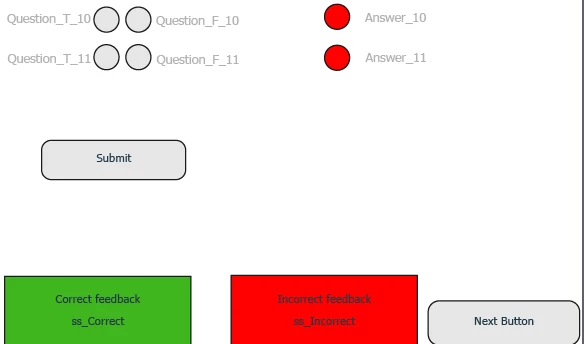
There are two questions. Here is a screenshot of the names too.

One can think of it as a multiple choice - multiple response question. The user must give correct answer to both questions. Only then the green shape should be shown.

If there is only one correct answer, the red shape should be shown.

On enter I use this bit

$('div[id^="Question"].cp-frameset').on("click", manageButtons );

function manageButtons(e) {

  var target = e.target.id ;


  var trueind = /_T_/;

  var falseind = /_F_/;

  var invTarget = (target.match(trueind) && target.replace(trueind,"_F_") ) || (target.match(falseind) && target.replace(falseind,"_T_") );

  cp.changeState(target, "selected");

  cp.changeState(invTarget, "Normal");

}

  cp.hide("ss_Correct");

  cp.hide("ss_Incorrect");

Attached to the Submit button I use this bit

theAnswers = {

"Answer_10" : "Question_T_10",

"Answer_11" : "Question_F_11",

}

for (answer in theAnswers) {

rightAnswer = theAnswers[answer]

theState = cp.getCurrentStateNameForSlideItem(rightAnswer);

if (theState != "Normal" )

{cp.show("ss_Correct");

cp.hide("ss_Incorrect");

} else {

cp.show("ss_Incorrect");

cp.hide("ss_Correct");

}

}

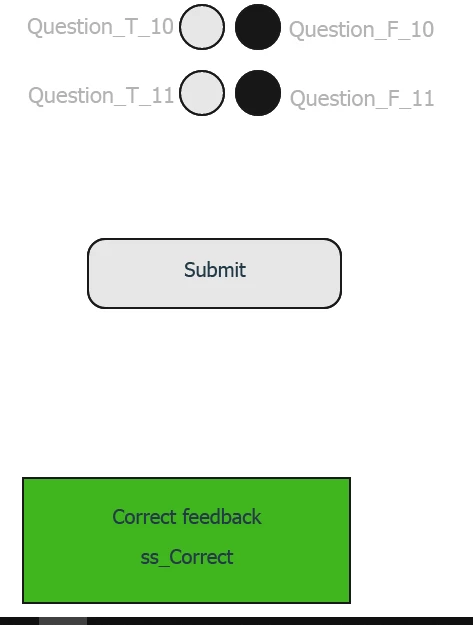
The issue is that it seems that only the second question is taken into account.

Even if I give wrong answer to the first question but correct to the second, I still get the correct shape.
Would anyone have a look please?

Thanks in advance

Bobby

    This topic has been closed for replies.

    12 replies

    Paul Wilson CTDP
    Community Expert
    Community Expert
    June 18, 2019

    I have seen this desire to have many true false on one slide and I fully understand the problem. What many folks don't realize is that you can achieve the same learning outcome by simply rephrasing your question stem. This will save you a bunch of testing and troubleshooting. For example, instead of asking the learning "Please mark the following statements either True or False.", instead create a multiple choice question that simply states "Please indicate which of the following statements are true." Problem solved and you get to use the default functionality and Captivate. Life is short. Once complete you can begin working on the next challenge rather than trying to reinvent the authoring tool.

    Paul Wilson, CTDP
    Inspiring
    June 18, 2019

    Thanks for your input Paul.

    On a theoretical level, if the new wheel turns faster than the old one I would prefer to reinvent it.

    On a more practical level, your suggestion absolutely makes sense, but as I mentioned already, I cannot format the tick-boxes the way I want + cannot include a link as part of an answer. Also I am not even going to dig into the limitations of the stacking of objects on a quiz slide.

    If you could propose a way to do this (see image) with the out of the box KC slide, I will totally agree with you that the tool should not be "reinvented".

    Thanks again

    B

    chrismay_at_delta6226261
    Inspiring
    June 18, 2019

    But how long is it going to take you to reinvent the faster wheel? You want to create your own custom questions/interactions. A noble cause indeed, I am no fan of Captivate's defaults. But that is a lot of work and testing and then testing with different devices, different browsers, etc. From your own words, you are not too familiar with JS. I would recommend bringing a developer with Javascript experience on to the team. Your project is not rocket science, but there is too too much to convey in a forum post.

    Or you can run with Paul's suggestion and look into changing out some of the default images used to create Captivate's questions with your own images. Check out this post: Re: How to change the design of multiple-choice checkboxes

    chrismay_at_delta6226261
    Inspiring
    June 17, 2019

    Look at the way you check your answers. Using a loop like that, only the last case, in your example, the second question, will determine if the state = normal.

    What you need to do is to set a variable routside your loop, say var completedCorrectly=true;

    Then go through your loop and if any answer is incorrect, set completedCorrectly=false;

    After the loop you can test completedCorrectly if its still true, then all the answers were correct, if not, then at least one is wrong.

    Inspiring
    June 17, 2019

    Thanks for jumping in, chrismay. I wish I had the more advanced level to do that.

    So basically I need to create a variable that will track if all are correct, e.g. var completedCorrectly which will be by default false.

    Do I have to create a variable for each of the questions (each line)?

    Where should I put them. Not really good with the JS I am afraid. Trying to do my first steps.

    Thanks again

    B

    Lilybiri
    Legend
    June 15, 2019

    Just for the sake of other users reading this thread.

    I introduced the word 'custom question' on my blog about 10 years ago. I used it at that moment for a question that cannot be done with embedded Captivate ffunctionality. At that moment there were no themes, with editable quizzing master slides, no shapes a limited set of widgets. I was thinking about partial scoring (has been introduced since but only for MCQ), about multiple T/F on one slide etc.

    Meanwhile Captivate has improved a lot.  By simply tweaking the quizzing master slide, you wont even need advanced/shared actions. KC slides are part of Captivate as well. Advantage: you don't have to bother about a lot of sitations like resetting the slide, use of Clear button, because everything is built in. Replacing the text feedback by a viisual feedback is a breeze, since feedback containers are now shapes. Add to that state changes etc....

    Why make it complicated when it can be so simple?

    Sorry, Bobby, this is not about choosing between Advanced/Shared actions and JS, this is about time efficiency. My time is precious to me, like to take advantage of embedded workflows over programming (with any possible method). Advantage is that you also have responsive themes, which makes tweaking for reponsive projects also possible.

    Inspiring
    June 15, 2019

    Thanks Lieve,

    I do not use responsive projects.

    I can have tens of scenarios/questions in a project. I have done this with Shared Actions.

    I estimate that doing it with JS will be much faster. It is also about time efficiency.

    Also, in terms of formatting, lets get a practical example.

    The one on the left is out of the box list of answers, the one on the right is a custom list of answers.

    Is it possible to get to what I have on the right with the out of the box solution? Would be good to learn if possible.

    Thanks

    Lilybiri
    Legend
    June 15, 2019

    Quiz slide is not just the design. I have been creating tons of custom question slides. I know how much work it is setting everything up as wanted.  What you are showing here is even contrary to all accepted protoclos: you are using checkboxes where everyone would expect radio buttons.

    I will not try to answer anymore when it is about JS. I just popped in because other users could start to think that you need to use JS in Captivate to do something useful, which is NOT the case for the majority of use cases. I had to debug lot of courses from developers copy/pasting JS scripts without knowing what they did. Consider it much better first to learn to use the embedded features, which are muc more flexible than many developers imagine.

    Think about what has to be used to reset the KC slide, to add a possbility to reset the answers, to make it random to use it in a responsive project, to allow multiple attempts and have a different feedback showing up on each attempt, etc.... Lot of situations you have to solve with your scripts, and which can be done automatically with the out of the box KC slides, and when you know how to tweak them. You don't have to believe me of course.