June 14, 2009
Question

Custom template add space/borders around published project?

  • June 14, 2009
  • 1 reply
  • 424 views

I use CP4, published using SCORM 1.2, using a custom template, and the borders on the skin are set to 1.  I end up with lots of white space on the left, right and bottom.  I had a custom Template designed for us that contains copyright information and 2 links for printing.  Could this be adding the extra space around the actual project?  Ideally I want the project to take up the entire window.

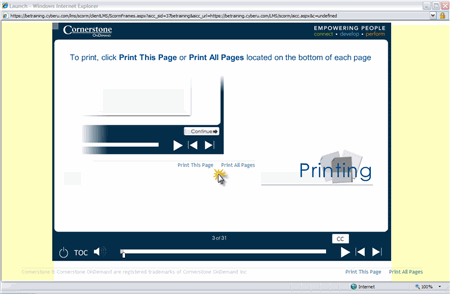
Here is a screen shot, I highlighted the areas in yellow.
Manola

    This topic has been closed for replies.

    1 reply

    Lilybiri
    Legend
    June 14, 2009

    Your screenshot shows a CP-movie, designed in a resulotion with a quite different width-heigth ratio than the screen it is displayed on. In your example you have a traditional ratio for the CP-file (such as 800x600 or 1024x768, a ratio=4/3), but the screen is a widescreen, so it has another ratio (I'm less sure, could be 15/6 or even 16/9). And because the CP-file is displayed in a browser window, this takes even more away from the heigth. I hope you understand this explanation a little bit... If you want the CP-file to show in a window that takes up almost all the screen size you should have taken this into account when creating the file, by choosing another resolution setting, adapted to the screen it will be shown on. But the problem is that there are very different resolutions for those screens: for the moment I'm working on a traditional screen (1280x1024 pixels), my laptop is set to a resolution of 1440x990 and the netbook to 1024x595...

    Since you are using CP4: do you plan to show the TOC? If yes, this TOC will be shown outside of the current display area, so some "white area" will disappear. In the TOC you could insert the copyright information, a logo ...

    As for printing: did you try the widget Printslides? So the user could print the slides he wants...