


Participating Frequently
July 2, 2024
Question

custom toc javascript index.html

  • July 2, 2024
  • 2 replies
  • 288 views

Hi everyone,

I'm trying to customize the index.hmtl for the toc. I found a code in the community an added some informations. It looks like this:


window.addEventListener( 'moduleReadyEvent', function ( e )

{

var topIcon = document.getElementsByClassName( 'tocBookmarkHeadingStyle' )[ 0 ].style.visibility = 'hidden';

var bmIcons = document.getElementsByClassName( 'tocBookmark' );

var bmEx = document.getElementsByClassName( 'tocExpander' );

var bmText = document.getElementsByClassName( 'tocText' );

for ( var i = 0; i < bmIcons.length; i++ )

{

bmIcons[ i ].style.visibility = 'visible';

bmIcons[ i ].style.right = 2 + 'px';

bmEx[ i ].style.right = 1 + 'px';

bmEx[ i ].style.top = 6 + 'px';

bmEx[ i ].style.width = 26 + 'px';

bmEx[ i ].style.height = 26 + 'px';

bmEx[ i ].style.left = 1 + 'px';

bmText[ i ].style.right = 26 + 'px';

bmText[ i ].style.left = 47 + 'px';

}

});


The toc looks like this now:
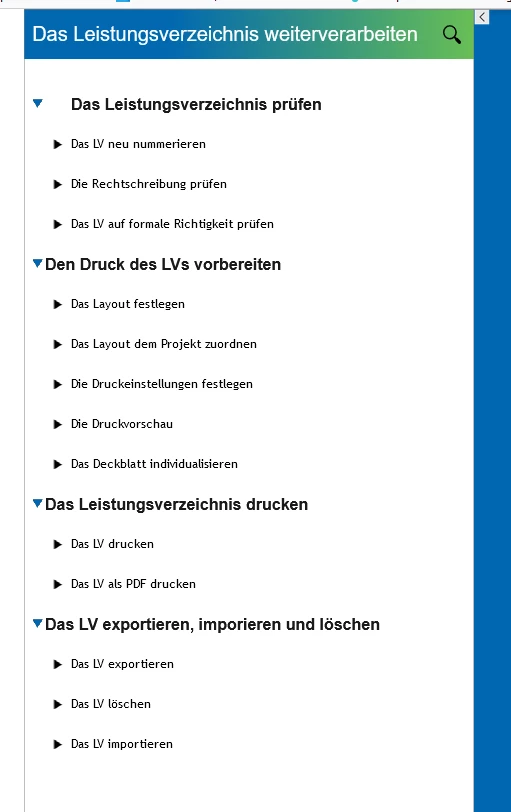
I don't understand, why the first topic is different from the others. the class is the same. So it should react the same way, correct? Do you have any ideas/ suggestions how to fix it so that all topics are aligned left?


Thanks


Maria

    This topic has been closed for replies.

    2 replies

    Participating Frequently
    July 2, 2024

    The version is Captivate classiv 11.8.2.254.

    Sorry I forgot about that

    Lilybiri
    Legend
    July 2, 2024

    Thanks. It looks like you are on the German version. Are you aware that there is a more recent version which is 11.8.3.8? First Captivate Classic was rather buggy, some bugs were solved in this version and you have several new features like CSV and SRT import. 

    Participating Frequently
    July 3, 2024

    Thanks for the advice. I updated captivate. However it didn't solve the problem, but I had to renwe some changes we made and I also started agaim to use the following code, that I have found here (thanks to TLCMediaDesign😞


    window.addEventListener( 'moduleReadyEvent', function ( e )

    {

    var topIcon = document.getElementsByClassName( 'tocBookmarkHeadingStyle' )[ 0 ].style.visibility = 'hidden';

    var topIcon = document.getElementsByClassName( 'tocSlideTitleHeading' )[ 0 ].style.left = 10 + 'px';

    var bmIcons = document.getElementsByClassName( 'tocBookmark' );

    var bmText = document.getElementsByClassName( 'tocText' );

    for ( var i = 0; i < bmIcons.length; i++ )

    {

    bmIcons[ i ].style.visibility = 'hidden';

    bmText[ i ].style.left = 10 + 'px';

    }

    });


    Because there was still a problem about the text position I removed everything related to text, like this:


    window.addEventListener( 'moduleReadyEvent', function ( e )

    {

    var topIcon = document.getElementsByClassName( 'tocBookmarkHeadingStyle' )[ 0 ].style.visibility = 'hidden';

    var topIcon = document.getElementsByClassName( 'tocSlideTitleHeading' )[ 0 ].style.left = 10 + 'px';

    var bmIcons = document.getElementsByClassName( 'tocBookmark' );

    for ( var i = 0; i < bmIcons.length; i++ )

    {

    bmIcons[ i ].style.visibility = 'hidden';


    }

    });


    I also changed some Icons in the toc- and TOC_icons-folder. For example blankBookmark and fullBookmark are the same Icon now so there is no change when you click on the Icon. It looks like this now:

    It doesn't look 100% how I wanted but its neat.


    Hope, this can be helpful to anyone sometime.

    Lilybiri
    Legend
    July 2, 2024

    Sorry, cannot help you with the JS part of your question and hope one of the JS expert will pop in. However there are not many left at this moment since the release of the new Captivate.

    Please, for their sake, mention the exact version number of Captivate you are using. You find the full number under Help, about Captivate.