


chrismay_at_delta17095116
Inspiring
July 21, 2021
Question

Custom Widgets are not valid for HTML5 publishing

  • July 21, 2021
  • 1 reply
  • 104 views

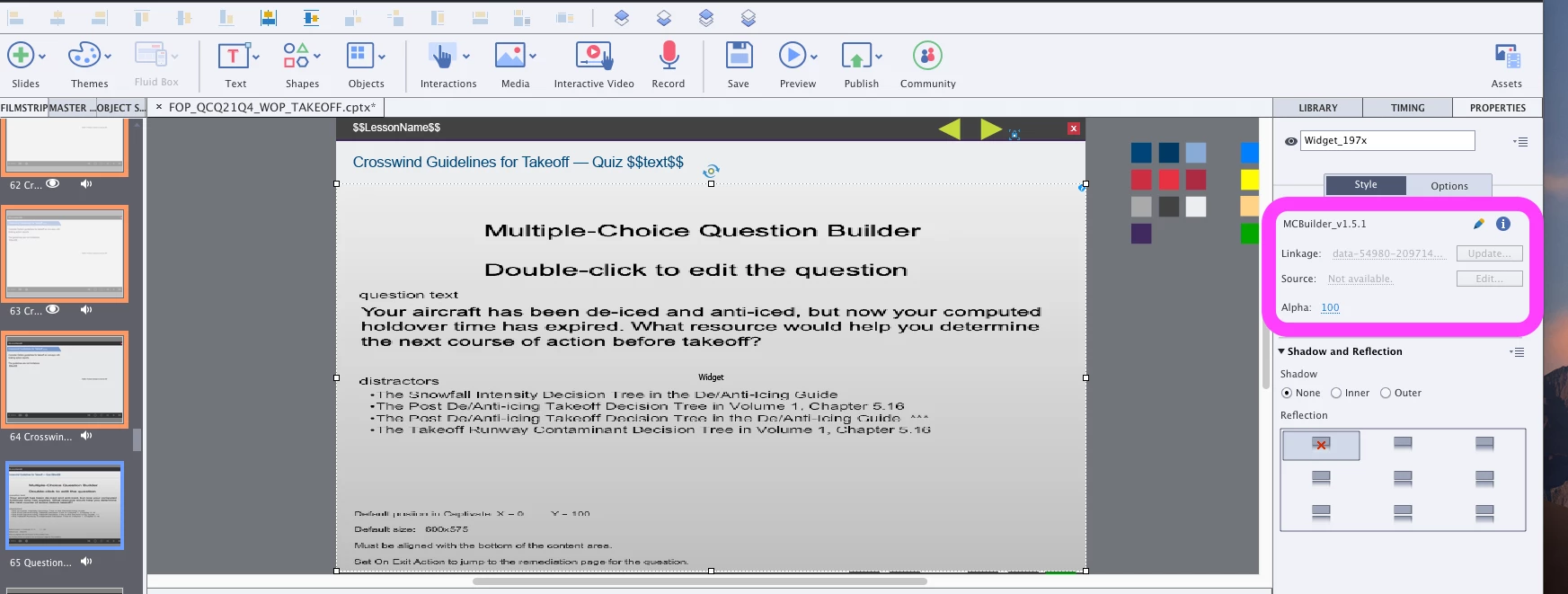
We are starting to see some weirdness when using some custom developed widgets. Sometimes when we publish a cptx file containing these widgets, we get a msg saying they are not supported in HTML5 format.


There are usually multiple copies of the same widget, but only some instances are being reported as incompatible. When viewing the properties of the widgets, the ones that are being reported as incompatible have something like this in the linkage field: data-54890-209714...   For the instances that are considered compatible, they have the following: MCBuilder_v1.5.1 (the name of the widget file). 


I'm thinking that the linkage pointing to the widget file is corrupt. Has anyone seen anything like this? @RodWard ?


If we delete the widget and import again, that usually fixes the issue. We have seen this happen multiple times in the same file and it is becoming a source of pain.


We have seen this in versions 
11.5.5.676
11.5.1.499
 

    This topic has been closed for replies.

    1 reply

    chrismay_at_delta17095116
    Inspiring
    July 21, 2021

    I just got off the phone with Adobe, they said that sometimes the widget linkages break and you need to relink. I did not get an explination of why the linkage breaks or how to prevent such things from happening. The tech did not seem to think this was a bug or an issue.

    RodWard
    Community Expert
    Community Expert
    July 22, 2021

    I have not experienced this particular issue with any of our widgets. Since last year when Flash was finally buried we no longer sell or supply SWF widgets.  


    The only suggestion I have would be to rename each widget file you insert. Captivate usually tries to avoid duplicating objects.  So in certain cases, if you insert a component multiple times and that component has exactly the same filename as others before it, Captivate just keeps the original component and ignores your updated component.


    This is a big problem with inserted OAM files for example.  Our workaround has been to always rename each new version of the OAM so that it was different to the previous version and use the Web Properties dialog and Import button to replace all instances of the same OAM found in the project file.

    I don't know if this will work for you, but I would suggest you try it just in case the issue you are encountering is due to having multiple instances of the widget that are perhaps slightly different versions.


    Alternatively, if you want to force Captivate to import all instances separately and keep them, you may have to change the name of the widget file so that Captivate THINKS each is a different widget.  I realise this is a less than ideal solution because it may increase filesize, but it's all I can suggest for now.