

Deciphering Advanced Actions
Hello Community,
I need a little assistance deciphering some advanced actions. I'm updating a project that was originally completed in Cap7. They've asked me to fix some lag issues that were happening on their knowledge check slides (caused by some timeline problems which I fixed without issue) and fix a bookmarking issue that causing no bookmark to be set if the participant didn't exit the course properly. I'm doing this in Cap9The courses are being run from a mySQL database that courses communicate with via Javascript (this part is a little beyond me, ok a lot beyond me). I think I took care of the bookmarking issue without a problem on the first course by assigning the previously programmed "SetBookmark" advanced action the original developer employed to the "On Exit" function of each slide. I still need to test this in the deployed environment, but I think I got that one.
The problem I now have is that I've gotten to the second of the two courses that I supposed to update and the setup is different. Now there are advanced actions applied to each slide "On Enter" and "On Exit." I have a general idea of what their function is but I'm not sure what their exact implication are. Can someone help me out with the effects of these AAs and let me know I how I might be able to adjust them so that if someone exits the course unexpectedly their progress is saved?
Here are some screen shots:
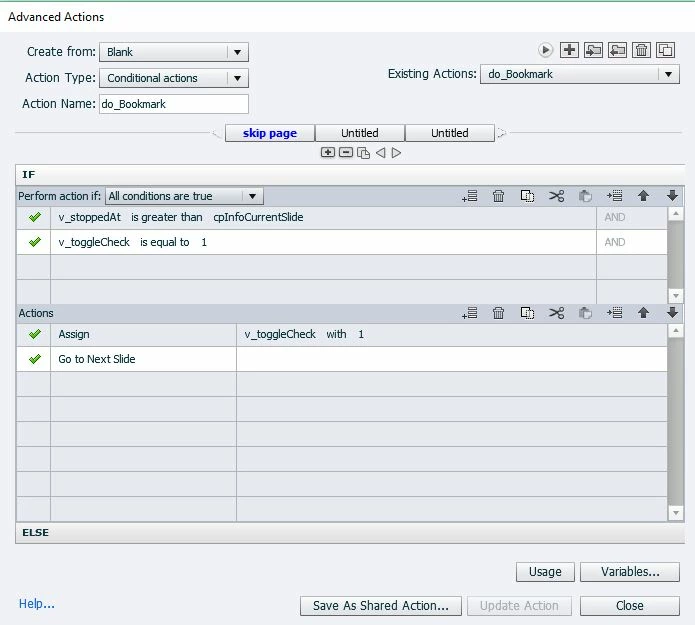
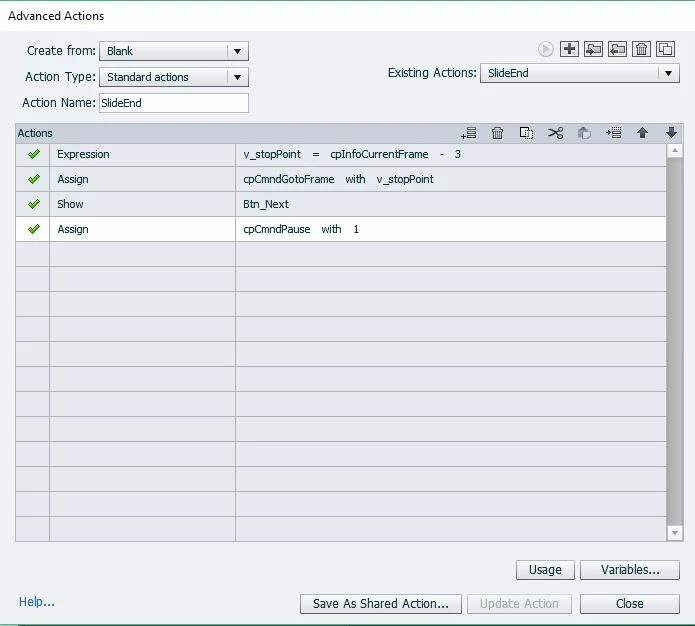
Any assistance is really appreciated
 AdChoices