April 4, 2010
Answered

Delay before clicking to next screen

  • April 4, 2010
  • 1 reply
  • 424 views

On my lates project, I've noticed that when I click on the clickbox I created, it takes a few seconds before the screen actually advances.

It does this on every screen in this project so it must be a settings somewhere.

Here is the link

http://robertensing.com/help/Windows_7.html

Can anyone help me out on this one?

Thanks

Robert E
    This topic has been closed for replies.
    Correct answer Captiv8r

    Hi there

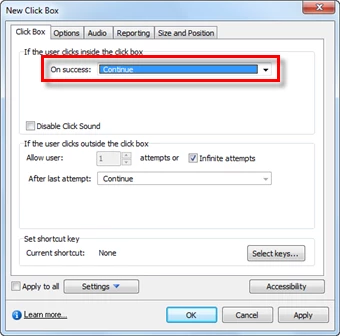
    My guess is that you have "Continue" selected as the action for the clickable object. You likely want to change the action to "Go to next slide".

    Cheers... Rick

    Helpful and Handy Links

    Captivate Wish Form/Bug Reporting Form

    Adobe Certified Captivate Training

    SorcerStone Blog

    Captivate eBooks

    1 reply

    Captiv8r
    Captiv8rCorrect answer
    Legend
    April 4, 2010

    Hi there

    My guess is that you have "Continue" selected as the action for the clickable object. You likely want to change the action to "Go to next slide".

    Cheers... Rick

    Helpful and Handy Links

    Captivate Wish Form/Bug Reporting Form

    Adobe Certified Captivate Training

    SorcerStone Blog

    Captivate eBooks

    April 4, 2010

    You are correct.

    Because I knew I was going slid-to-slide in this one I never changed it.

    I'll switch it when I get home.

    Thanks

    Robert

    April 6, 2010

    That did the trick.

    Thanks again.