elearningbuilder11
Inspiring
April 3, 2018
Question

Delete Advanced Actions?

  • April 3, 2018
  • 2 replies
  • 2042 views

Hello,


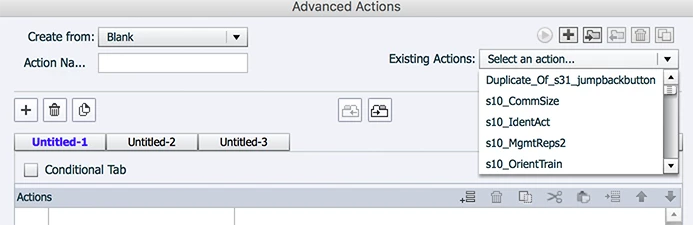
How do I delete Advanced Actions from my project?

I use the 'garbage can' icon, but when I close and re-open, they are all back! 

WTH!!!  ????

This topic has been closed for replies.

2 replies

Participant
November 15, 2018

This is just another reason why I hate Captivate. The lameness of Captivate cannot be overstated.

Lilybiri
Legend
November 15, 2018

You should never use a tool which you hate. I like Captivate, but know very well strengths and weaknesses. Try to find a tool which you like. I explained here why the advanced action couldn't be deleted, and that was due to a user workflow which was not correct. It is sort of protection not to be able to delete an action that has not been taken from an event it was attached to. Logical to me, maybe not to you?

Participant
November 16, 2018

I have found a tool I like. It's called Articulate Storyline. But the company I work for uses Captivate, so it's not my choice.

Lilybiri
Legend
April 3, 2018

Did you check the Usage of the advanced actions before trying to delete them? You cannot delete an AA that is in use.

I don't see an AA open in your screenshot, you cannot delete from the Dropdown list, you hae to open an action, check its Usage. If it isnot i use you can delete that action.

Another advantage of Shared actions over Advanced actions, they appear in the Library and can be managed a lot easier. Whenever possible I use Shared actions.

SharedActionsIntro

elearningbuilder11
Inspiring
April 3, 2018

Yes,

I tried that:

Doesn't matter,

Soon as I close, and re-open, they are ALL back

What the heck?

Lilybiri
Legend
April 3, 2018

That is not what should show up, means that something has gone wrong: maybe you deleted an object to which tha action was attached without taking it from the event. If an action is really unused, this is the dialog box that should appear:

Believe, me. I have lot of experience with Advanced actions since version 4, have created tons of them for clients. If you don't see this dialog box with the Usage button, you are not able to delete that action.