Inspiring
January 14, 2015
Question

Delete Image Buttons from Properties Window

  • January 14, 2015
  • 10 replies
  • 938 views


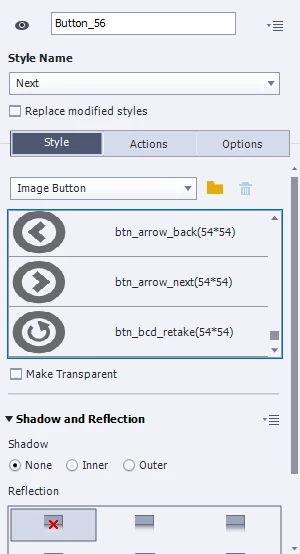
Is there a way to delete image buttons from the properties wondow? I see the trash can icon but it is grayed out after I select the buttons I want to delete.

    This topic has been closed for replies.

    10 replies

    Inspiring
    March 26, 2019

    I just found this thread because I had the same problem. Clicking around according to Captiv8r's first suggestion, here's what I discovered that actually worked.

    My situation: I created an image button called "handcuffs," then I wanted to change/update the image. Not possible. I needed to delete the "handcuffs" button then upload a new image.

    The image button, unfortunately looked like this: (with "handcuffs" selected, the trash can was disabled.)

    1. Click a different button in the list, as if you're switching to a different button that's already in the button list (doesn't matter if it's custom or from the gallery). The trash can now enables. Click it.


    3. A "Delete Unused Button Images" dialogue box opens and lists any custom buttons you created that are not in use.You can now delete your custom button because it is not in use.

    Lilybiri
    Legend
    March 26, 2019

    There are many reasons why I never use image buttons anymore since shape buttons appeared 7 years ago with Captivate 6.

    Can you give me one advantage of image buttons over shape buttons, filled with images (which can be different for each inbuilt state)? Shape buttons do not have those annoying things like image buttons: you don't need to create three separate graphic files, you are not stuck with unwanted buttons, you can easily edit the image, change the image.

    Inspiring
    March 26, 2019

    Wow, I cannot give you one advantage. I guess I have been sufficiently smacked down!

    Captiv8r
    Legend
    January 15, 2015

    Hi there

    I believe the trash can will remain disabled unless you were to use the file folder icon next to it to browse to and select an image that isn't really part of the basic images supplied. For example, in the screen capture below, I've browsed to and selected an image that isn't supplied with Captivate. Then I selected one of the regular Captivate button images. At that point, the trash can became available as my project was no longer using the image it was.

    Cheers... Rick

    SM6601Author
    Inspiring
    January 15, 2015

    Problem is I already deleted the buttons I don't use from the gallery so I can't browse to them anymore.

    SM6601Author
    Inspiring
    January 15, 2015

    I deleted them as files from the gallery itself and not through Captivate.