
Inspiring
February 8, 2017
Answered

Delete Old Buttons from Properties Panel

  • February 8, 2017
  • 1 reply
  • 241 views

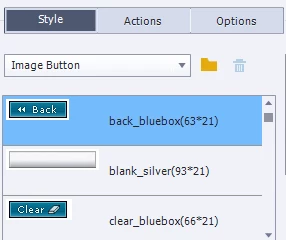
Does anyone have a solution to delete old buttons showing up in the Properties panel? I can't delete them out of the Objects Style Manager either. I already deleted them from the Buttons folder on my C drive. Using CP 9.
    This topic has been closed for replies.
    Correct answer Lilybiri

    Another reason why I rarely use image buttons, but shape buttons (can be filled with images).

    Try cleaning the Preferences: run the appropriate CleanPreferences file in the subfolder 'utils' of the installation folder.

    1 reply

    Lilybiri
    LilybiriCorrect answer
    Legend
    February 8, 2017

    Another reason why I rarely use image buttons, but shape buttons (can be filled with images).

    Try cleaning the Preferences: run the appropriate CleanPreferences file in the subfolder 'utils' of the installation folder.

    SM6601Author
    Inspiring
    February 8, 2017

    How do I get the CleanPreferences file?

    Lilybiri
    Legend
    February 8, 2017

    It is in the subfolder 'utils' under the installation folder of Captivate. You need administrator rights.