
kevin_stagg
Known Participant
February 26, 2014
Question

Deleting a Caption Style that Just Won't Go Away...

  • February 26, 2014
  • 1 reply
  • 1099 views

I have created numerous custom caption styles and am using it no problem within my course. I have been able to delete other captions in the past without any issues however there seems to be a "ghosting" of some styles still on my course:
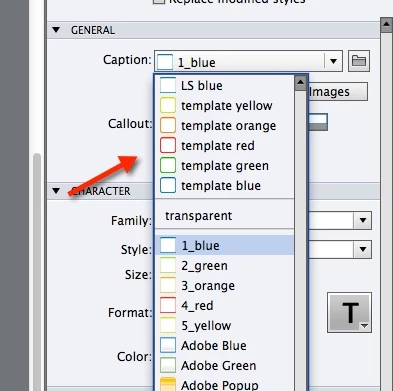
Everything above the transparent textbox style are styles which I have deleted from the Captivate 7 > Gallery > Captions directory (both the .bmp and .fcm files). I have removed those styles from all of my captions within the course slides (and edited the Object Style Editor accordingly). I have closed Captivate, and gone into the Captivate 7 > utils folder and used the CleanPreferencesMac file to clear out any files which may still be in my cache. Not sure what else I need to do here?

Many thanks!

Kevin

This topic has been closed for replies.

1 reply

RodWard
Community Expert
Community Expert
February 26, 2014

These older captions are cached INSIDE your CPTX project file.  That's why they show up in your list.

Captivate 7.0.1 now has an extra option in Properties > General when you select a caption that allows you to Delete Unused Caption Images.  If you are on Cp7 you might be able to use that.

kevin_stagg
Known Participant
February 26, 2014

Hey there Rod -

Unfortunately it only eliminated one of those - LS blue. As you mentioned before, it must be INSIDE the CPTX file because I did a search on my entire computer and the .bmp and/or .fcm files are nowhere to be found. Looks like the rest of them are stuck there, which stinks, and I'll need to start from scratch. I really wanted to send in a clean theme and one of the other sets has a caption which isn't displaying correctly (but the other 4 in the set are). Again, as you mentioned, an example of the file being cached within the CPTX file.

SIGH. Hide the pencils because I'm about to go postal here.