
Inspiring
October 23, 2019
Question

Deleting a spare theme

  • October 23, 2019
  • 1 reply
  • 596 views

Afternoon,


I am using Adobve Captivate 2019 11.5.1.499


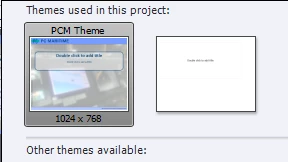
I am in the process of creating a theme for my projects, which will be spread over multiple captivate projects. I used a basic blank cptx project to create the theme as I go, which I import into my other main projects. It has just come to my attention that in this basic project used to create the theme I have 2 "PCM Theme" being used. See the image below.


How do I delete the unused right hand theme. They are both called the same name. Not sure how it happened.


Thanks


    This topic has been closed for replies.

    1 reply

    Lilybiri
    Legend
    October 24, 2019

    Where did you save the custom theme? Normally if two themes appeared, it means you have still object styles and/or master slides in that project from both themes. Maybe even two Theme color palettes. Difficult to give advice, because have no idea how and when you saved the themes. Can you fint the cptim files on your system?

    NavmasterAuthor
    Inspiring
    October 25, 2019

    Hi, Thanks for the advice. That is what I'd thought, but couldn't see anything so in the end since it was a basic project to create the theme I started a new project and imported the theme and it only showed up as 1 entry. Not sure what was happening. Perhaps becuase the theme was of the same name?

    Thanks

    Lilybiri
    Legend
    October 25, 2019

    Reason why I asked WHERE you saved the custom theme, they are stored somewhere and have the extension cptm. I always use a custom theme and save it in the same folder as the project itself. As you know two identical files with same name cannot exist, maybe you had both in different folders.