


Participating Frequently
October 19, 2022
Question

Demonstration playback issue in Captivate 2019

  • October 19, 2022
  • 1 reply
  • 264 views

I'm using Captive 2019, and I recorded a demonstration in some software that involved typing in fields and selecting options from drop-down lists. In playback, these appear offset, like in the images below:
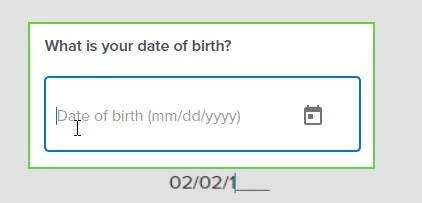
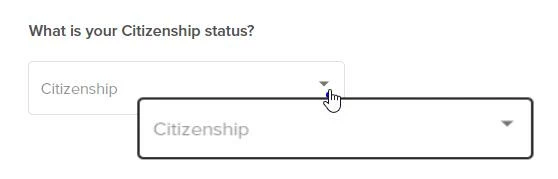


Any idea how to fix this? And - how to avoid this in the future?

This topic has been closed for replies.

1 reply

Lilybiri
Legend
October 19, 2022

Which exact version do you use on which OS? CP2019 had 3 main releases (11.0, 11.5 and 11.8) and more patch releases. You find the full version number under Help, About Captivate.

I suppose you captured a software simulation in demo mode although a Video Demo would have given you a better quality and a full-blown editor.

How did you set up the screen? By changing Dpiawareness in AdobeCaptivate.ini? Or did you set up your screen so that the display size could be set to 100%?

Do you see this problem after publishing or during Preview HTML in Browser? 

Participating Frequently
October 19, 2022

Hi,

I'm using  Captivate 11.5.5.553 on Microsoft 365.

I did record in demo mode.

I don't understand your question about screen set-up...is this something in Preferences?

The problem occurs in both the Preview and after publishing.

Thanks!

Lilybiri
Legend
October 19, 2022

You are on Windows, 10 or 11? 

Go into settings, Display, Scale and Layout. You'll find the Display resolution there.

Since it is also the case in Preview, it cannot be due to Scalable HTML output.