


Inspiring
February 9, 2021
Question

Dialog box will not close - Captivate New Style

  • February 9, 2021
  • 1 reply
  • 546 views

Anyone else running into this issue? 


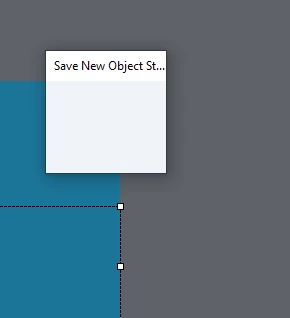
Basically, when creating a new style for an object or text caption, the dialog box will attempt to open but not fully. Looks like it is shrunk, but you are unable to expand it. Won't let you close it and you are locked out of the software. Have to do a hard close via task manager to resolve which causes a loss of work


Has been happening quite freqently over the last few weeks, can't seem to figure out the cause. Any help or insight would be appreciated.
 

This topic has been closed for replies.

1 reply

Lilybiri
Legend
February 9, 2021

Was looking at your tags... not related to the question as far as I can see.

I never had the problem, and I do use the Object Style Manager a lot. Can you tell which exact version you are using? Check for the full version number under Help, About Captivate? Which OS?


Did you try the usual Clean the Preferences already? 


You are probably aware - as a workaround - that you can also create a new style from the Properties panel? Not an answer but could help.  Use the hamburger menu:

Inspiring
February 9, 2021

Captivate 2019: version 11.5.1.499


Yep, that workaround is actually what tiggered the latest freeze. I'm actually suspecting my IT department on this. They will NOT whitelist anything for Captivate on our network and this happens anytime I try to access our purchased assets from the asset menu. Just only started happening over the last few weeks with the styles and other pop-up dialog boxes. IT is altering our network and computer rights in prep for HITRUST CSF frameworks, audit, and certification.


Basically any new dialog box that appears will occasionally only load like half-way then offers no option to close or interact with it. New Styles, Advanced Actions, JavaScript window, etc. Causes me to have to end the process for the program. Couldn't find a hotkey to close a dialog box (or one that works).


Funny thing, may or may not be related, but the program is sucking up resources. CPCefHelper.exe is runing 27 instances (at the time of this post) alongside Adobe Captivate, Console Host, and Node.js (server side JavaScript) within the program. Each of those eat up about 15-40 MB of memory on my machine (excluding the main 3). Could be a memory issue that is failing to load the program scripting for the dialog windows, but IT won't let us access that data on our machines.

Lilybiri
Legend
February 9, 2021

It looks like your IT people definitely are screwing up your Captivate.

You are not using the most recent version neither. For Win we are on 11.5.5.553 at this moment.