Participant
March 9, 2016
Answered

Disable a button until all buttons clicked

  • March 9, 2016
  • 2 replies
  • 2952 views

Hello,

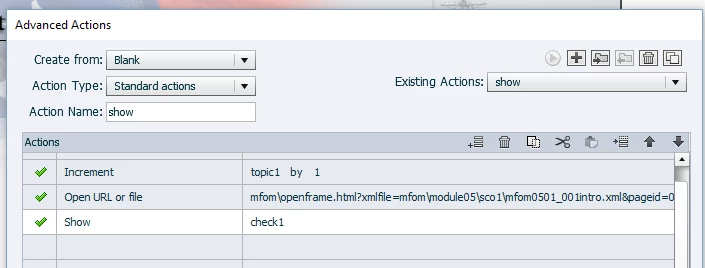
I have a menu of 7 buttons on one slide that launch .xml files from 'On Success show script' and show the green checkmark. I've got it working fine, but I want Button 7, Certificate, to remain disabled until all 6 buttons have been clicked in any order.

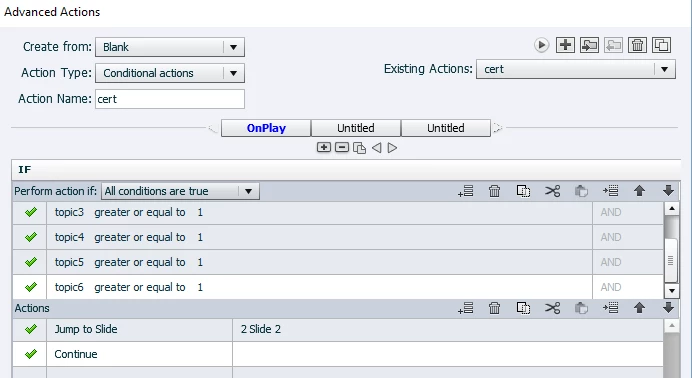
I've been writing various advanced conditional actions and I can't seem to get it right.

I created 6 variables called topic1, topic2, topic3, etc, default to 0.

The Action cert set to Jump to Slide but I was just testing the IF statement, it doesn't jump to slide either haha.

What am I doing wrong!

Thanks in advance- METZ

    This topic has been closed for replies.
    Correct answer Lilybiri

    Rod, Lilybiri,

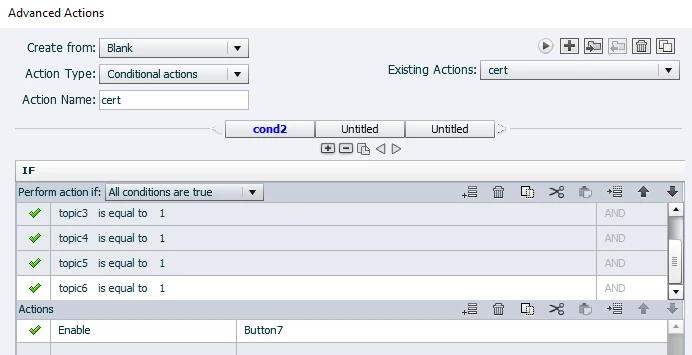
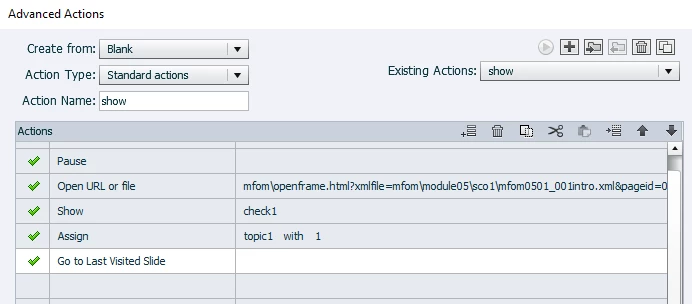
    I updated all my Adobe Products. My intent is to hide the Certificate button until all the other buttons have been clicked. I was troubleshooting the variable=1 issue and started testing Go to next slide, thus the first set of screen caps. I attached 2 new ones of both actions as they are set now, based on your recommendations above. It's not correct though.

    Lily- Shouldn't there be an action on the first decision? Does the order of standard actions matter?

    Rod- you said, your Conditional Action will need to get executed repeatedly for it to work properly. How do I redirect back to the menu slide? Do I add a go to last visited slide, or Slide 1 to the actions named show?


    Yes, I explained what the first decision should look like in my previous answer.

    First decision 'Always'

    IF 1 is equal to 1

        Assign topic1 with 1

        Show... or Open URL                   what you wanted to do with the standard action

    Second decision 'CheckComplete

    IF topic1 is equal to 1  AND

         topic2 is equal to 1  AND

         ...

    Enable Button 7             you'll have to disable to start with, since you tell you are not leaving the slide, this can be done with the On Enter action

    2 replies

    Participant
    March 9, 2016

    Thank you Rod! I watched the first video but you have your links going to other slides in the movie. My links go to URL's, I only have 1 slide. I'm not sure how to apply your instructions to my situation.

    RodWard
    Community Expert
    Community Expert
    March 9, 2016

    The project that contains your menu slide has a Conditional Action, right?

    Any you have variables in that same project that are tracking completion of each of the target modules, right?

    Your conditional action (as shown in the tutorial) needs to have a final Decision Block that checks if ALL of the module tracking variables have been set to a value that indicates completion.  If so, then that final Decision Block's action is to UNHIDE the elements of the slide that will ONLY be shown when all modules have been completed.

    That's how it works.

    Participant
    March 9, 2016

    Thank you for helping me, I'm sorry, I don't have a ton of Captivate experience. I understand your video setup for the most part, I just don't know how to apply the same principals to my video where I only have 1 screen.  I do have a final decision block called "cert" that is executed On Enter. I've set the action to Show button7, ELSE hide button7.

    On the 6 menu buttons is where I've got the On Success Execute Advanced Actions ie; show, show2, show3, etc. I've got Actions to pause, go to the URL, and show checkmark. These three work. This is the right spot to put these commands right?  I am having problems getting the topic1, topic2, topic3 variables to equal to one, in order for Button7 to appear. They are default 0 to start. I've tried assign, increment, expression-- nothing is working. What is the proper code to tell each menu button to =  1 when clicked, so that when all 6 buttons = 1, button 7 appears?

    RodWard
    Community Expert
    Community Expert
    March 9, 2016

    Take a look at this video tutorial:

    Create a Dynamic Menu Slide in Adobe Captivate | Infosemantics Pty Ltd

    It explains how you should be using your variables.