tunedin76
Inspiring
September 9, 2016
Answered

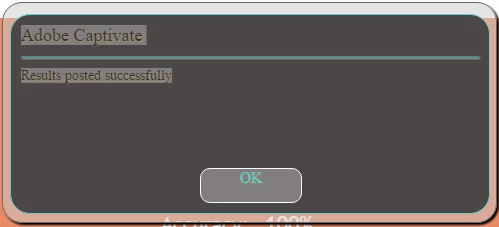
Disable the "Results Posted Successful" box after reporting to internal server.

  • September 9, 2016
  • 2 replies
  • 924 views

I have found out how to mute the dialog asking for name and email id, but how can I disable the box:

Or change the words / title? but disable would be preferable.

Thanks

-James

    This topic has been closed for replies.
    Correct answer TLCMediaDesign

    These are where they appear (not exactly like you described, and also I thinkI had the wrong object property...).

    window.addEventListener("load",function()

      {

      setTimeout(function()

      {

      var script = document.createElement('script');

      script.type = 'text/javascript';

      script.src = 'assets/js/CPXHRLoader.js';

      script.defer = 'defer';

      script.onload = function()

      {

      var lCSSLoaded = false;

      var lJSLoaded = false;

      function constructDIVs()

      {

      if(lCSSLoaded && lJSLoaded)

      {

      initializeCP();

      }

      }

      cpXHRJSLoader.css('assets/css/CPLibraryAll.css',function() {

      lCSSLoaded = true;

      constructDIVs();

      });

      var lJSFiles = [  'assets/js/jquery-1.11.3.min.js','assets/js/CPM.js','assets/playbar/playbarScript.js' ];

      cpXHRJSLoader.js(lJSFiles,function()

      {

      //console.log("js loaded");

      var imagesJSONFiles = [ 'dr/imgmd.json' ];

      cpXHRJSLoader.loadImagesJSON(imagesJSONFiles,function(imageToJSONPathMap){

      cp.imageToJSONPathMap = imageToJSONPathMap;

      var imageJSONFiles = [ 'dr/img1.json' ];

      if(window.location.protocol.substr(0,4) == "file")

      cpXHRJSLoader.preloadURLs(imageJSONFiles, constructDIVs);

      lJSLoaded = true;

      if(window.location.protocol.substr(0,4) != "file" || !imageJSONFiles.length)

      constructDIVs();

      });

      });

      }

      document.getElementsByTagName('head')[0].appendChild(script);

      },1);

      },false);

    BTW thanks for all your help


    Put the script:

    cp.model.data.rtDialog.rtWarningTitle = "Message Box Title";           

    Just above the  constructDIVs(); function.

    Since you are editing the JSON you need to do it before Captivate creates the elements in the DOM.

    I have this in all of my projects.

    2 replies

    Participant
    January 24, 2021

    Any way to delete this on the latest version? Struggling to find a way or any help

    TLCMediaDesign
    Inspiring
    January 25, 2021

    Problem is that even if you hide it, it's still waiting for you to click one of the buttons.

    Participant
    January 25, 2021

    As in on the review page? That wouldn't be an issue if the user clicked on continue.

    Or are you referring to a different button?

    Is there a way to hide it at all?

    TLCMediaDesign
    Inspiring
    September 10, 2016

    I believe the text of the message is located in this file:

    C:\Program Files\Adobe\Adobe Captivate X x64\en_US\strings.txt

    You can change the title for html5 if you insert this line in the index.html just above the lines in bold:

    cp.model.data.rtDialog.rtWarningTitle = "Message Box Title";            

    lJSLoaded = true;

    constructDIVs();

    tunedin76
    tunedin76Author
    Inspiring
    September 11, 2016

    Do you know if there is any way I can have it update the index.html as I render the project (I have ove 100 projects and I would like to avoid having to edit the index.html for each of them.

    TLCMediaDesign
    Inspiring
    September 12, 2016

    You can put the code in the html template file located here:

    C:\Program Files\Adobe\Adobe Captivate 9 x64\HTML\index.html