Inspiring
April 16, 2021
Answered

display , hide image after 3s?

  • April 16, 2021
  • 4 replies
  • 502 views

good evening Forum,

how to display then hide image after 3s

advanced actions adobecaptivate2019

Thanks

    This topic has been closed for replies.
    Correct answer Stagprime2687219

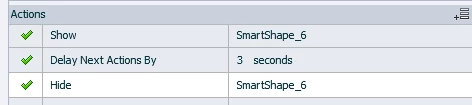
    You could try an advanced action similar to this...

    It would need to be called by some sort of event of your choosing, of course.


    4 replies

    mail5FF7Author
    Inspiring
    April 16, 2021

    Thank you all.

    Stagprime2687219
    Stagprime2687219Correct answer
    Legend
    April 16, 2021

    You could try an advanced action similar to this...

    It would need to be called by some sort of event of your choosing, of course.


    Stagprime2687219
    Legend
    April 16, 2021

    @TLCMediaDesign @Lilybiri 

    LOL - I think we were all literally typing at the same time to this 

    Lilybiri
    Legend
    April 16, 2021

    🙂 Was a very simple question.... the multistate object which I offered as well has some advantages but didn't want to explain them.

    TLCMediaDesign
    Inspiring
    April 16, 2021

    Lilybiri
    Legend
    April 16, 2021

    Three possibilities, I suppose you want to use a button?

    • Add the image to a custom state for the button. I will label the state 'PlusImage'. Use this advanced (or shared) action:
        Change state of button to 'PlusImage'
        Delay next action for 3 seconds
        Change state of button to 'Normal'
    • Put the image on the slide, but hide it using the On Enter action of the slide. Use the button with this advanced action
         Show Image
         Delay next action for 3 seconds
         Hide Image
    • Without any advanced action: delete the text in the Success shape of the button and fill the button with an image. The default time for the success shape which will appear automatically when clicking the button, is 3 seconds but can be edited in the Timing Properties. Perhaps the easiest workflow, since you don't need any advanced action.

    In the second setup yiou could even apply an fade effect to make it smoother.