
Do you have a missing Hyperlink button?
Has anyone experienced this.
I'm using Captivate 8.0.1 and over the last few months I've been working on project that requires a lot of hyperlinked text in both text captions and smart shapes. Recently I've noticed that the hyperlink buttons that are in the properties inspector have been a little flakey, sometimes not appearing when I've selected text in a smart shape. Usually I would simply deselect the shape and select it again and it would appear or switch between style and options. However, today all of a sudden it's stopped appearing completely! I've tested my project on another computer with the same version of Captivate and it worked fine... and then it stopped working on that computer too!
This is how it looks on one computer.... (before that one stopped working)
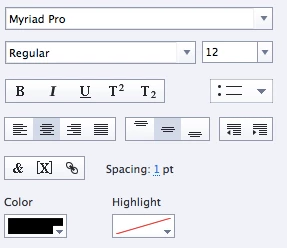
This is what it looks like on my other computer with the same smart shape text selected... (missing!)
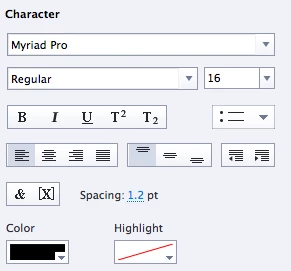
I can only now "Insert", "Modify" and "Delete" hyperlinks using the dropdown menu, luckily as I've got multiple modules in this course that all use hyperlinks in smart shapes.
If anyone has experienced this same issue please let me know.
 AdChoices