
Inspiring
November 7, 2016
Answered

Does anyone have any tips on how to document Advanced Actions?

  • November 7, 2016
  • 1 reply
  • 496 views

Hello,

Does anyone have any tips on how to document Advanced Actions?

It is very easy to use put the actions in, but I can't see any way to put a 'Comment' or 'REM' in so that I can remember what the logic is and why I'm doing it.

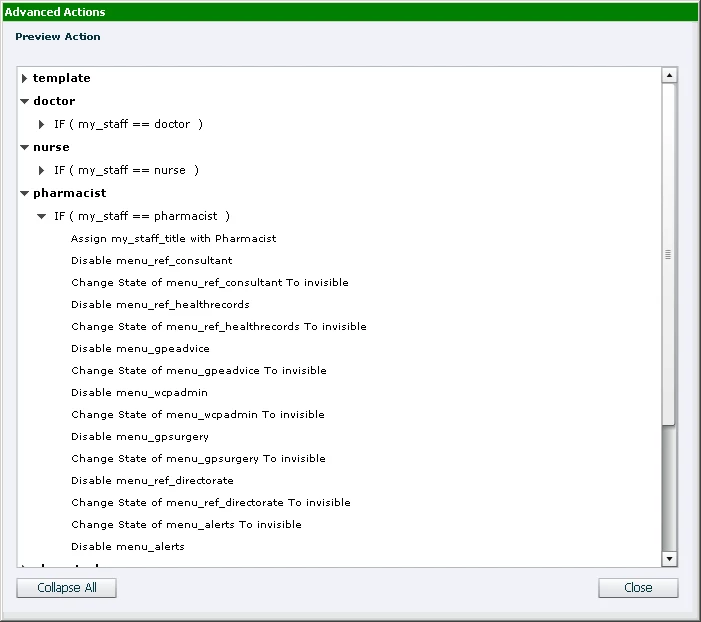
The Preview Action does give an overview, but to be honest its not much use.
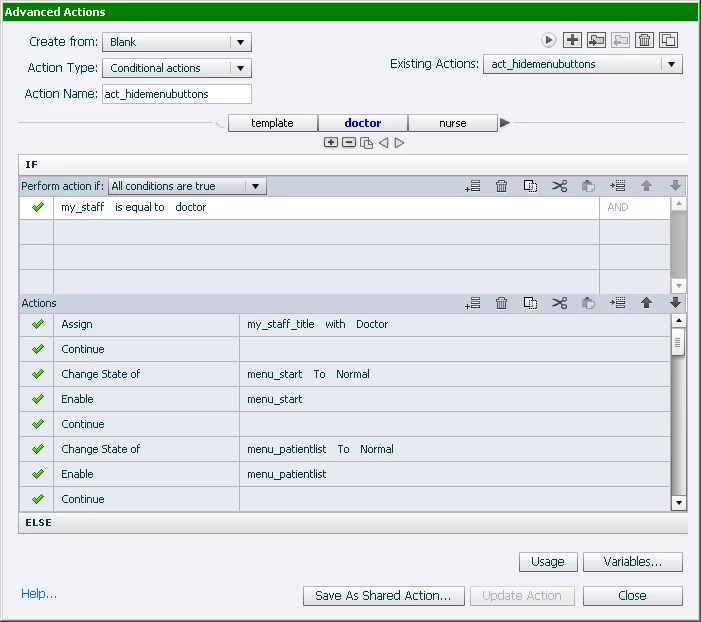
As a workaround I use the 'Continue' option to break up the lines in to logical chunks which I find makes it easier to read.
Any thoughts would be welcome.

Thank you

Peter.

    This topic has been closed for replies.
    Correct answer Lilybiri

    Use shared actions whenever possible, you can add a description for the

    action and for the parameters.

    For advanced actions, since they are limited to one file, I tend to add

    text containers in the scratch area of slides, with description of vars and

    actions.

    Adding Continue means that you override the default behavior of advanced actions which is that the playhead remains fixed. You are releasing the playhead by Continue. Multiple Continue commands have the same result.

    A good labeling for any object, for the actions, variables and decisions can also help. Not a real comment however.

    Alternative: switch to JS if you are on HTML output or to AS for SWF output. Both languages have the possibility to insert comments.

    1 reply

    Lilybiri
    LilybiriCorrect answer
    Legend
    November 7, 2016

    Use shared actions whenever possible, you can add a description for the

    action and for the parameters.

    For advanced actions, since they are limited to one file, I tend to add

    text containers in the scratch area of slides, with description of vars and

    actions.

    Adding Continue means that you override the default behavior of advanced actions which is that the playhead remains fixed. You are releasing the playhead by Continue. Multiple Continue commands have the same result.

    A good labeling for any object, for the actions, variables and decisions can also help. Not a real comment however.

    Alternative: switch to JS if you are on HTML output or to AS for SWF output. Both languages have the possibility to insert comments.

    Inspiring
    November 9, 2016

    Thank you Lilybiri.