Participating Frequently
May 23, 2015
Answered

Does anyone know how to replay a video or slide using a button in captivate 8?

  • May 23, 2015
  • 3 replies
  • 3748 views

I have tried tutorials for older versions but to no avail in version 8.  I know it is possible with the advanced actions but cant get my head around it.

Cheers Peter

    This topic has been closed for replies.
    Correct answer Lilybiri

    I didn't realize you were trying to replay the same slide even though you said you were ;-)

    I did some basic testing and this worked:

    We can use the action on the slide to set a variable when the slide is entered which will help:

    1. Create a new variable that gets assigned when the slide is entered. For example, Slide2Status and set the default value to 0.
    2. Now go to your slide, select Action, Assign, select the new variable you created and put a 1 in the With field (we are changing the value from 0 to 1)
    3. Create a conditional advanced action and set it up so that if Slide2Status = 1, them jump to Slide 2 (screen shot attached)
    4. Assign the Advanced action to the button
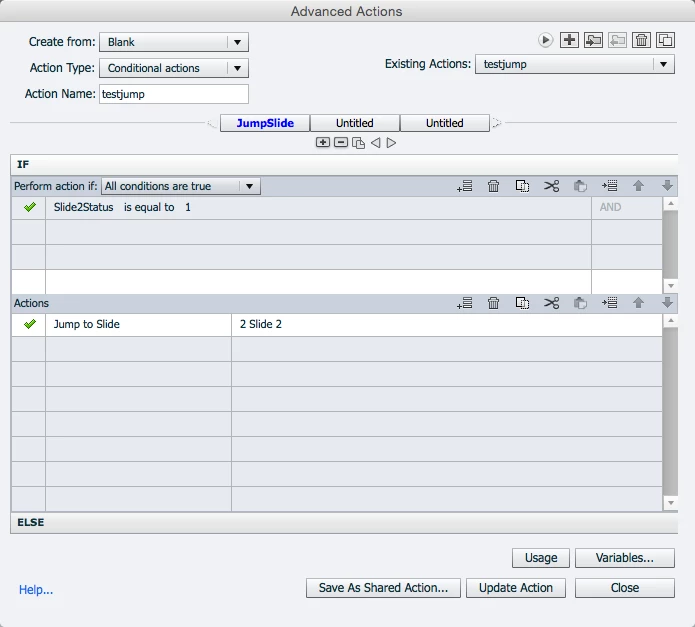
    It worked for me...hopefully this will work.

    Dave


    That is very complicated, Dave. Did you try my solution that I have posted

    multiple times?

    3 replies

    Inspiring
    January 13, 2017

    I've tried this solution without success. I also tried the more complicated solution where you set a variable on Enter and set the expression based on the variable. Both solutions cause my basic animation to fail, meaning the audio plays but the animation does not. If I click pause and play a couple times, it works. I'm on a PC using 9.0.2.4. Can anyone help?

    Lilybiri
    Legend
    January 13, 2017

    I answered in your thread, please don't do double posting, it is just more work for me.

    Participating Frequently
    May 23, 2015

    Thanks for your help everyone I was stumped with this and I appreciate the solutions.

    Enjoy the Weekend

    Cheers

    Pete

    Inspiring
    May 23, 2015

    Create the button and then add an action to it: On Success, Jump to slide" and select the slide.

    Is that what you're looking for?

    HTH

    Dave

    Participating Frequently
    May 23, 2015

    Hi Dave,

    Thanks for your reply,

    Unfortunately that doesn't work as it wont let you select the current slide.

    I have also tried putting a slide in previous for .01 of a second but when it goes onto the next slide the slide will play instead of pause as it has been commanded on enter.

    Thanks anyways

    Peter

    DieterVR123
    Participating Frequently
    May 20, 2016

    The answer to my question concerning event video was easier than I thought:

    Comment (moderator): this work flow is only for SWF output, and in certain circumstances. It will not work for HTML output, nor responsive projects. That is the reason why I even didn't mention this old work flow (I used it before HTML hype started) in my article:

    Replay (slide) Button - Captivate blog

    @DieterVR123: Wanted to add this to your answer,


    For HTML we found some kind of "workaround":
    This is not 100% perfect, since jumping to a blank slide (for example; a white slide, or same background as your slides) and waiting 0.1 second to jump back results in a little flicker.