
Inspiring
March 2, 2017
Answered

Does Captivate 8 offer Ctrl, Shift, None for Shortcuts?

  • March 2, 2017
  • 1 reply
  • 479 views

I am using Adobe Captivate 8. My question is about Shortcuts.

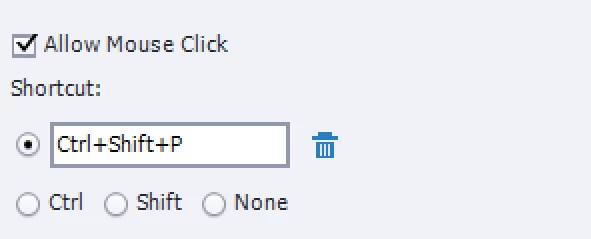
After viewing a tutorial about Shortcuts for buttons and click boxes, I noticed the shortcuts had three radio buttons under the Shortcuts options within Properties Panel. These were

  1. Ctrl
  2. Shift
  3. None

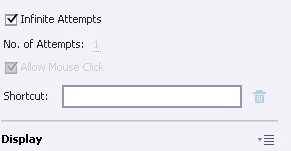
Are these options only offered in Adobe Captivate 9? I do not see them in my version of Adobe Captivate 8. However, I do see that the Properties/Shortcuts WILL RECORD the Ctrl and Shift options once I click them on my keyboard.
This topic has been closed for replies.
Correct answer Lilybiri

No! Enter any key, and you could combine it with CTRL or SHIFT. The empty field next to Shortcut key will show you the key you pressed. I don't even bother about checking CTRL/Shift, just press the combi I want:

1 reply

Lilybiri
LilybiriCorrect answer
Legend
March 2, 2017

No! Enter any key, and you could combine it with CTRL or SHIFT. The empty field next to Shortcut key will show you the key you pressed. I don't even bother about checking CTRL/Shift, just press the combi I want:

cpbrandon
Inspiring
August 9, 2019

I realize this is a little older, but what exactly are those radio button options used for? Are they shortcuts in their own right, as in a user would be able to press CTRL only if that option is selected? I've never used them, but am sure curious.

Lilybiri
Legend
August 9, 2019

Sorry, me again.

You can use SHIFT or CTRL as shortcut key, but you cannot enter them in the field, because it would wait for another key since those keys are meant to start a combination. That is the reason for the two first radio buttons to allow those keys as standalone shortcut key.

The third option 'None' can be used when you want NO shortcut key at all. If you activate that button you'll see that the 'Allow Mouse Click' will be dimmed but activated. You need to click the button in that case.