
randyIES
Participating Frequently
July 11, 2016
Answered

Download file button does not pause audio

  • July 11, 2016
  • 1 reply
  • 293 views

Hi Everything,

I'm building a project where there is  a button set to "open URL or file".  I have told the file to open in a new tab and have unchecked the "continue playing the project" checkbox.  When the button is clicked, the slide pauses, but the audio for the slide does not pause.  I know people have dealt with this, but I can't seem to find decent instructions on how others have dealt with this.  Can anyone guide me in the right direction?

thakns
This topic has been closed for replies.
Correct answer Lilybiri

Sorry for a late replay, but wanted first to double-check a possible solution.

I checked the functionality of the 'Continue Playing Project', with F12 and F11 when using a simple action (from dropdown list in Actions tab) 'Open URL or File'.  The number of attempts for the button is set to infinite. I found that:

  • F12 (for SWF output) when clicking the button the first time, the slide audio will stop as expected;  when clicking another time (before the pausing point of the button) the slide audio will not stop, only the slide is paused.
  • F11 (for HTML output): the slide audio always continues playing, even for the first click.

After publishing this seems to be the same, but I didn't upload the HTML version to a webserver (my bad).

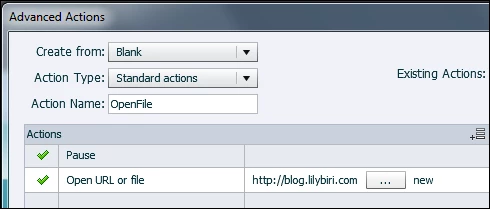
To provide a solution which works for both SWF and HTML output: replace the simple action by a short advanced action (you could turn it into a shared action with the URL or file as parameter):

This will work like you expect: slide audio is always paused.

1 reply

Lilybiri
LilybiriCorrect answer
Legend
July 12, 2016

Sorry for a late replay, but wanted first to double-check a possible solution.

I checked the functionality of the 'Continue Playing Project', with F12 and F11 when using a simple action (from dropdown list in Actions tab) 'Open URL or File'.  The number of attempts for the button is set to infinite. I found that:

  • F12 (for SWF output) when clicking the button the first time, the slide audio will stop as expected;  when clicking another time (before the pausing point of the button) the slide audio will not stop, only the slide is paused.
  • F11 (for HTML output): the slide audio always continues playing, even for the first click.

After publishing this seems to be the same, but I didn't upload the HTML version to a webserver (my bad).

To provide a solution which works for both SWF and HTML output: replace the simple action by a short advanced action (you could turn it into a shared action with the URL or file as parameter):

This will work like you expect: slide audio is always paused.

randyIES
randyIESAuthor
Participating Frequently
July 13, 2016

Hi Lilybiri,

Thanks for the advice.  I was thinking along those lines, but wanted to make sure I wasn't missing something simple.  I see this being needed multiple times in several projects coming up.  How can I make it a shared action (or something similar) so I can reuse the action and change the url each time?  I don't know how to make the URL a parameter.

Thanks,

Randy

Lilybiri
Legend
July 13, 2016

Sorry, should have double-checked as well. You are correct, it is not possible to have a file or URL as parameter in a shared action.

My bad.