
Participant
April 28, 2020
Answered

DpiAwareness = 1

  • April 28, 2020
  • 1 reply
  • 1024 views

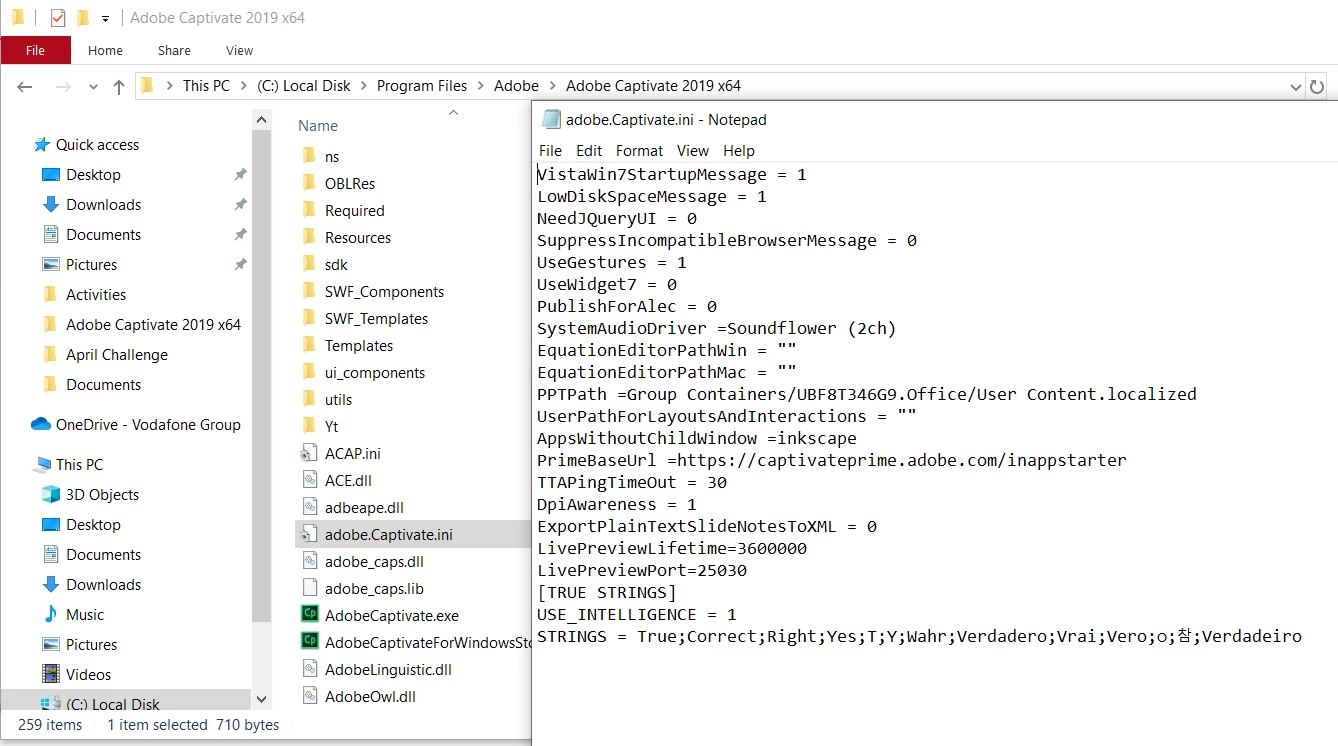
I've posted before but have yet to get a solution sadly. After downloading recent updates my DpiAwareness parameter was updated to 1 by my support team. However, when I try to create a Software Simulation I get the error that DpiAwareness must = 1. Can anyone help? Picture attached showing that the parameter is set to 1.
    This topic has been closed for replies.
    Correct answer RodWard

    Does this picture work?


    Your file name is miss-spelled.  It should be: AdobeCaptivate.ini not adobe.Captivate.ini

    1 reply

    RodWard
    Community Expert
    Community Expert
    April 29, 2020

    This value is set in an INI file located inside the Captivate install directory.  However, the value gets cached inside each CPTX when it gets first created.  So if your CPTX was created when the INI file had a different value, that's the value the CPTX will continue to use.  (Don't ask me why this is the case.  Ask Adobe.)


    So, my question would be:  Are you perhaps trying to add a software sim to an existing CPTX?  If so, try creating a new blank CPTX file and try adding the software sim to that (or better yet just do File > New Software Simulation).  Do you still see the error message then?

    kaynvfAuthor
    Participant
    April 29, 2020

    Thanks for the reply Rod. Unfortunately I am getting the error messages however I try to start a Software Simulation. I have tried from the initial screen when I start Captivate, selected File > Record a New > Software Simulation and with an existing recording open I've selected Slides > Software Simulation.

    Any other suggestions?

    RodWard
    Community Expert
    Community Expert
    April 29, 2020

    OK.  Then I cannot see how the INI file can be in the right place if the setting is not working.


    I don't get anything when I try to view your PNG file.  Is there any reason why you cannot add it to a post here using the small image icon on the toolbar so that it would be viewable?  If this is a screen shot of your INI file code, where is the INI file actually located?