Participant
December 20, 2016
Answered

Drag and Drop

  • December 20, 2016
  • 1 reply
  • 237 views

Hi 


I looked at some Drag and Drop videos on Captivate 8 and tried to create the same on Captivate 9. I created images of fruits and veg and two drop targets for each of the two categories. I then dragged a line from all the fruits into the fruit drop target and one from all the veg into the veg drop target, 


When I published this project, I deliberately tried to add a fruit into the veg basket and it allowed me to do so. In the training video the incorrect drop used to simply go back to its original position. Here It allows me to add all targets into a single box also. I am not sure if I am able to explain my issue clearly but have tried my best. Would appreciate any help!
    This topic has been closed for replies.
    Correct answer Lilybiri

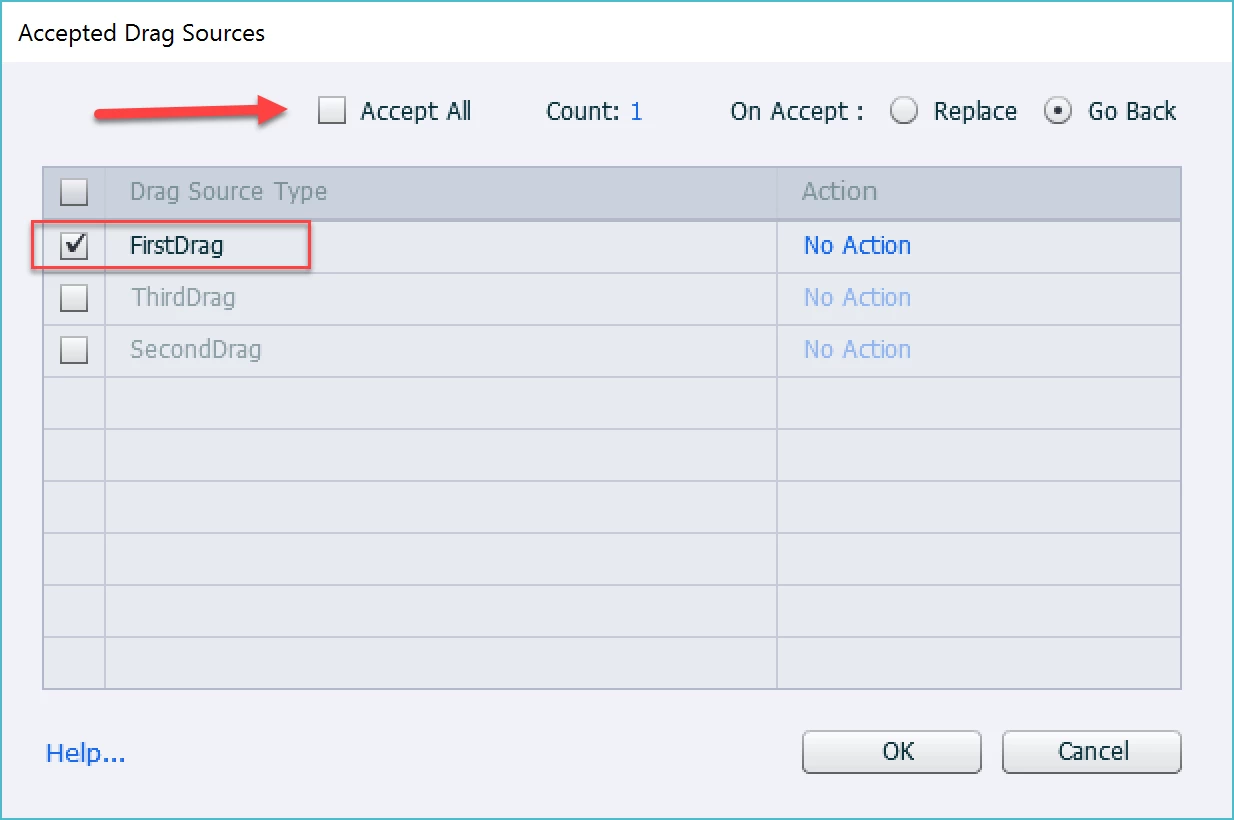
    The default setting for each drop target is 'Accept All'. if you want wrong drag sources to go back, you have to change that setting, and indicate only the correct drag source. That can be done in the Object Actions dialog box. You'll see a button 'Object Actions' in the D&D panel when you select a drop target. Look at this screenshot; I unchecked Accept All and indicated that the first drag source has to be accepted. Two others will 'Go Back'.

    More tips in:

    Drag&Drop tips - Captivate blog

    Drag&Drop in 2016 with Captivate 9 - Captivate blog

    1 reply

    Lilybiri
    LilybiriCorrect answer
    Legend
    December 20, 2016

    The default setting for each drop target is 'Accept All'. if you want wrong drag sources to go back, you have to change that setting, and indicate only the correct drag source. That can be done in the Object Actions dialog box. You'll see a button 'Object Actions' in the D&D panel when you select a drop target. Look at this screenshot; I unchecked Accept All and indicated that the first drag source has to be accepted. Two others will 'Go Back'.

    More tips in:

    Drag&Drop tips - Captivate blog

    Drag&Drop in 2016 with Captivate 9 - Captivate blog

    Participant
    December 22, 2016

    Great that worked....thanks so much !