


Inspiring
November 26, 2013
Answered

Drag and Drop accept actions not working in HTML5

  • November 26, 2013
  • 3 replies
  • 2935 views

Hi All

I am currently testing features of captivate on mobile devices, specifically iPads.

I have a very simple drag and drop interaction set up. There is one drop target, and 4 drag items set to it.

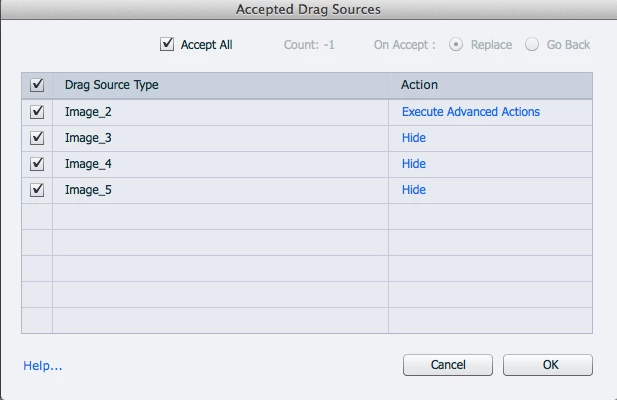
The drop targets accept methods are set to hide the draged items once they are dropped on the target. This works fine in preview mode, but does not carry over to HTML5. I have included a picture to show the actions I have set up that do not work.

Is there a way for these to work in HTML5?
Cheers

Lewis Carey

This topic has been closed for replies.
Correct answer nsukumar

Hi there,

This is a bug present in HTML5 publish. As a workaround can you please try changing the 'Opacity' to '0' and see it resolves the issue.

1. Select the Drop Target.

2. From the Drag and Drop panel, Drop Target section, Change the 'Opacity' value to '0'.

3. Publish the project.

Let us know it resolves the issue or not.

Thanks,

Nimmy Sukumaran.

3 replies

Participant
February 15, 2016

You Legend!!!

spaiks10864827
Participant
December 31, 2020

Bring to front all the dragable items. That is work for me. Arrangr, bring to front.

nsukumar
Adobe Employee
nsukumarCorrect answer
Adobe Employee
November 26, 2013

Hi there,

This is a bug present in HTML5 publish. As a workaround can you please try changing the 'Opacity' to '0' and see it resolves the issue.

1. Select the Drop Target.

2. From the Drag and Drop panel, Drop Target section, Change the 'Opacity' value to '0'.

3. Publish the project.

Let us know it resolves the issue or not.

Thanks,

Nimmy Sukumaran.

Inspiring
November 27, 2013

Thank you nsukumar! Changing the opacity works like a charm!

I tested the method (and its working) in both HTML5 in browser and on the iPad. There is even a nice fade effect too.

Thanks for your help

Legend
November 26, 2013

I just tested this and the source object is not hiding in both Preview and published output for HTML5. It works fine in SWF (both preview and published output) though.

Seems like a bug.

Sreekanth