Participating Frequently
September 29, 2016
Question

Drag and Drop Failure Message not showing

  • September 29, 2016
  • 1 reply
  • 1000 views

Hi all,

I created a standard drag and drop interaction.  Nothing Captivate can't do out of the box until....

I wanted to use a custom image for the success/failure messages instead of the default Captivate shapes.

I unchecked Captivate's default message captions and set the On Success and On Failure options to show my images.

On Success works fine.  On Failure never shows the image.

And before anyone goes down the rabbit hole of "infinite attempts" vs. "number of attempts", I can't find any difference in the settings there.

All I know is that when I select to use the default failure caption, it works as intended.  When I turn it off and back to the On Failure method, it doesn't.
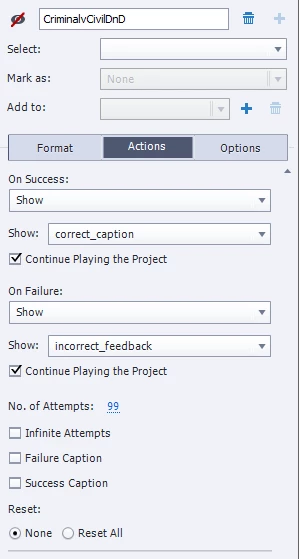
I've tried an advanced action to display and continue, and nada.

Is this a bug or have I missed a step?

Thanks!

This topic has been closed for replies.

1 reply

RodWard
Community Expert
Community Expert
September 30, 2016

It's not a bug (in my opinion).  You may not be understanding the way Captivate sees interaction "failures".  If multiple attempts have been allowed then the interaction is not deemed a failure until all allowed attempts have been exhausted without achieving a Success, by entering the correct answer.

With the Drag and Drop interaction, the Adobe designers chose to use the term Failure rather than On Last Attempt because their default failure captions DO show up with every unsuccessful attempt, no matter how many attempts you are allowed to perform.  (Quiz questions usually only give you up to three failure levels and captions.)

But what often gets confusing is that the On Failure event IS actually still applying to the overall interaction, not to each individual attempt on the interaction.

kiwidg1Author
Participating Frequently
September 30, 2016

Hi Rod,

OK, I'll give you part of that - after changing the number of attempts to 1, I generate my desired feedback image. And the fact they use the same terminology for two different actions is bad on them.

Is there a way then, to simulate Captivate's default action to show a specific message after each unsuccessful attempt that is NOT the default?

RodWard
Community Expert
Community Expert
September 30, 2016

Select each Drop Target object, and from the Drag and Drop > Format section go into the Object Actions.  You can then specify something gets shown or hidden according to which Drag Objects gets dropped on the target.