
toml46433434
Participant
September 12, 2017
Question

Drag and Drop Icons not appearing Presenter 11/PPT2016

  • September 12, 2017
  • 1 reply
  • 313 views

Adobe Presenter 11.0

Powerpoint 2016.

When I try to add a drag and drop question - the following screen appears:
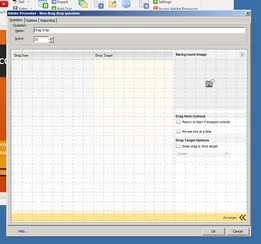
Notice it is devoid of the icons for inserting text or pictures.  I am unable to make any selections or enter information other than after hitting the arrange button I can select and deselect the check boxes.  Please advise.

This topic has been closed for replies.

1 reply

toml46433434
Participant
September 12, 2017

I found the answer deeper in the forum.  For completeness sake:

On the gray screen, Right click and go to Global settings

Go to advanced tab

Scroll down and click "Trusted location settings"

On the "Trusted location settings" window, click "add" on the bottom

Click "Add Folder" and select "Local disk c"

Click "Ok" and Confirm on "Trusted location settings" window