
Known Participant
April 10, 2018
Question

Drag and Drop not working correctly....

  • April 10, 2018
  • 2 replies
  • 283 views

HI,

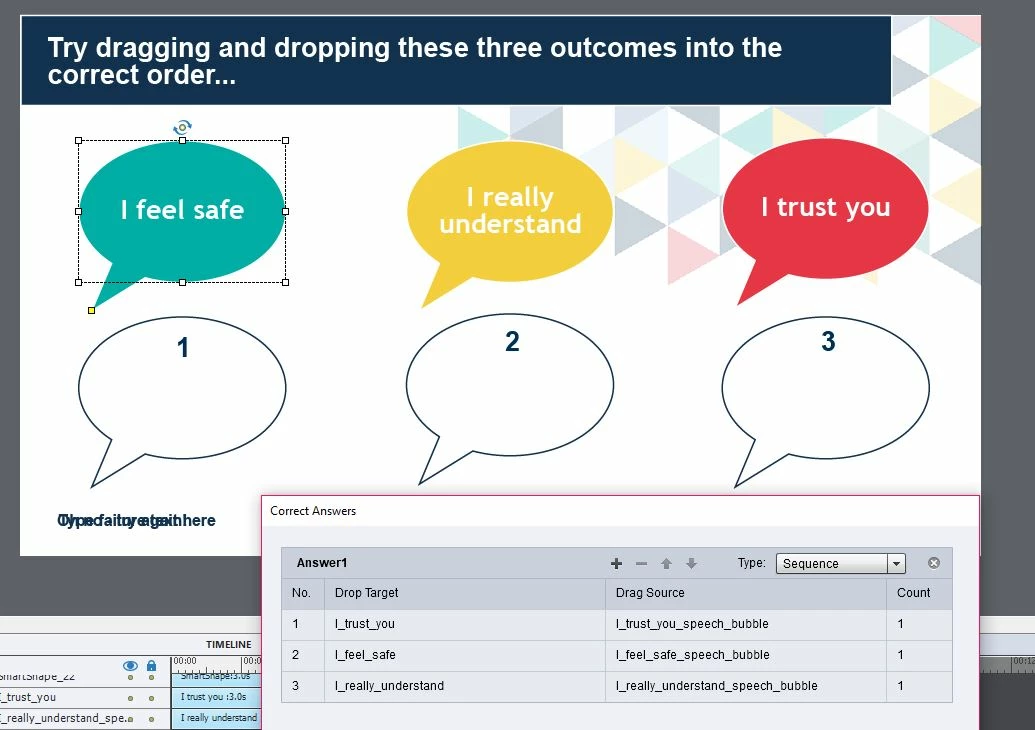
I've created a very simple drag and drop - three speech bubbles each of which to be placed into a corresponding speech bubble 'drop' target.  I've followed the wizard set up and assigned the correct answers but still when I preview and test my slide it is allowing any 'Drag' to sit within any 'Drop' target....

In addition my success and failure messages are failing to appear even through they are on the slide (bottom left hand corner)

Any help would be much appreciated,

Many thanks

Kim 
This topic has been closed for replies.

2 replies

Known Participant
April 11, 2018

Hi Lillybiri,

Thank you.  It appears to be working ok apart from the fact the success and failure messages fail to appear.  If I drag the speech bubbles into the incorrect order nothing happens.  I have to press the reset button to try again whereas I would of expected the failure message to appear...

Lilybiri
Legend
April 10, 2018

Can you first check that there is no overlapping of the bounding boxes of the drag sources and the drop targets?

You choose to have a sequence instead of a combination, is that important?

To be sure about the setup, can you add the Drag&Drop panel and make the interaction visible (look at the eye button top left of that panel). 

Where is the Submit button? How many attempts? What are the actions defined i the Actions tab?

Known Participant
April 10, 2018

Thank you for replying!

I've checked there's no overlapping boxes.  Yes I would like the speech bubble responses to work within a sequence...

I've checked the interaction visible eye button

I've also included a submit button with success and failure message but they don't seem to appear....

I can send a link through if that helps....?

Lilybiri
Legend
April 10, 2018

Can I see the interaction? In your first screenshot there was only one object selected, the interaction itself was hidden: no lines, no green nor blue boxes. Can you also show the Actions tab of the D&D panel. I don't accept files for debugging, sorry.