Drag and Drop: On Success Text Button Only Works ONCE!
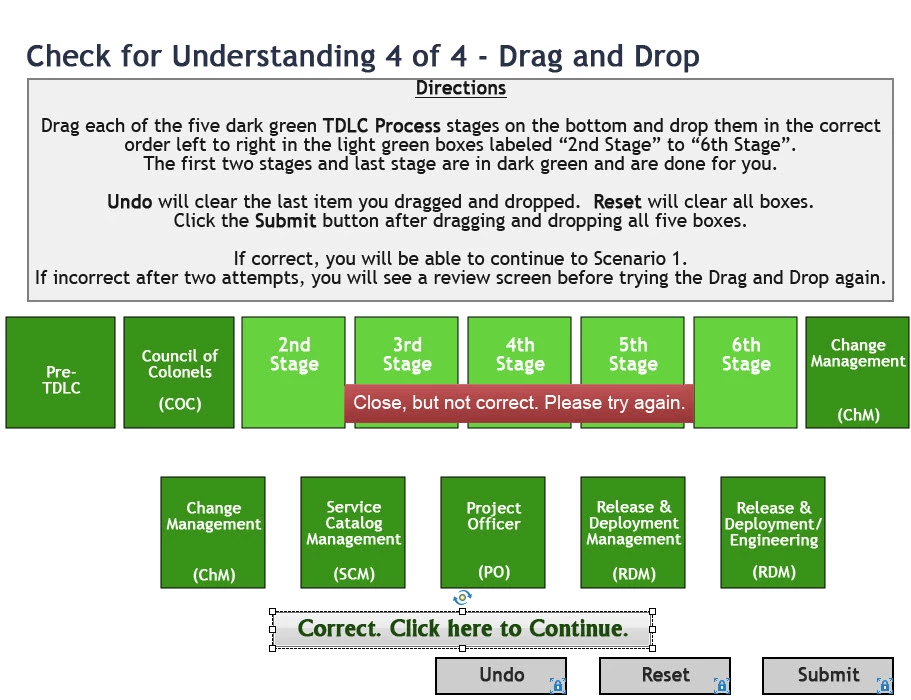
I've created a Drag and Drop in Captivate 8.1 that upon success shows a Text Button that has the action set to jump to another slide for infinite attempts. When the user does the drag and drop the first time and gets it correct, it show the Text button and they jump to the appropriate slide when they click it. All well and good.
We have it set up so that at the end of the CBT, the user can choose to review the entire CBT by clicking a Text Button on the last slide that takes them back to a second Title Slide (Slide 2) where the Playback Bar is set to show (as the first Title slide - Slide 1) has it set to be hidden as client wants playback bar hidden when the user is first going through the CBT) and the user can then hit the Forward button then to quickly run through the CBT all the way up to the drag and drop.
However, when they do the Drag and Drop correctly for a second time, they get the Text Button upon success but it DOESN'T WORK! It just goes to the next slide instead of jumping to another slide as it did the first time.
As far as I can tell, everything in the Properties Panels are set correctly. Perhaps someone else can see what's wrong or can come up with a workaround.
The Text Button that is only working once, is the one with the caption, "Correct. Click here to Continue." (in Properties Panel, it's Button_158). This Text Button appears after when they click and drag the dark green boxes at the bottom to the light green boxes above correctly and click the Submit button.
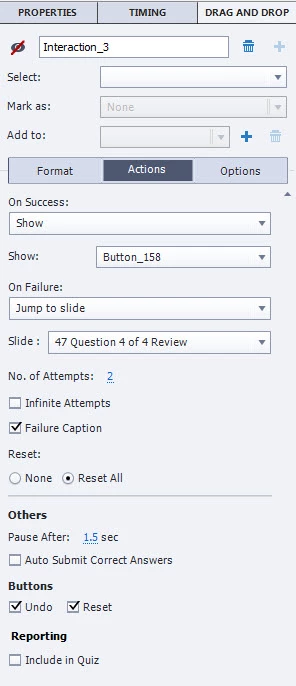
Here is the Properties panel for the Drag and Drop:
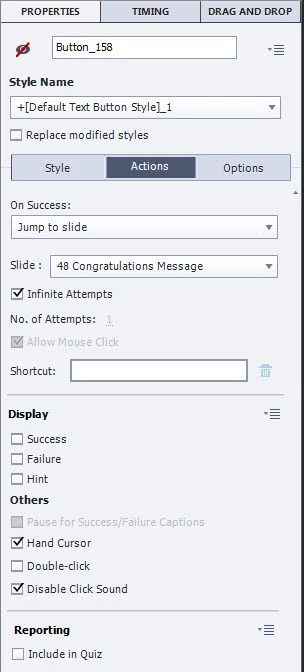
And here is the Properties panel for the Text Button:
Thanks for any help any one is able to provide!
 AdChoices