


Participant
October 6, 2022
Question

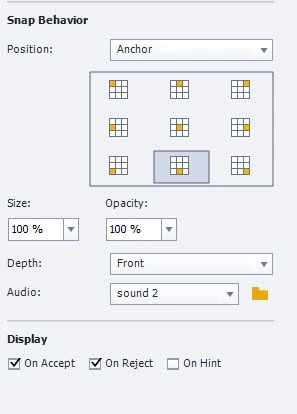
Drag and drop snap behavior audio volume control

  • October 6, 2022
  • 1 reply
  • 150 views

I have created a drag and drop activity that contains audio as a snap behavior. The audio file "sound2" was preloaded in the project (I did not add this as an audio file - see attached image). The audio contains a bell sound that rings when the drag object is dropped on the target. The bell sound is very loud and I would like to lower the volume, but I don't know how to do this, since it isn't an actual file. Is there a way to change the volume control on this sound clip?
 

    This topic has been closed for replies.

    1 reply

    Lilybiri
    Legend
    October 6, 2022

    New to Captivate? 

    Please open the project Library. You will find the used audio clip (sound 2) in the Library. Use the right-click menu on that clip and choose Edit with Captivate. There is a button in the Edit dialog box to change the Volume.

    All instances of the audio clip will use the changed volume.

    Lilybiri
    Legend
    October 10, 2022

    Could you solve the problem with my tips or do you have more questions?