dowbright
Known Participant
September 28, 2013
Answered

drag and drop with audio for success or failure for each object

  • September 28, 2013
  • 1 reply
  • 1897 views

Captivate 7

I've watched Pooja's video on this at least 20 times, literally, but I still can't find the complete instructions anywhere. Not even in the stuff I've spent a lot of money on. Ouch.
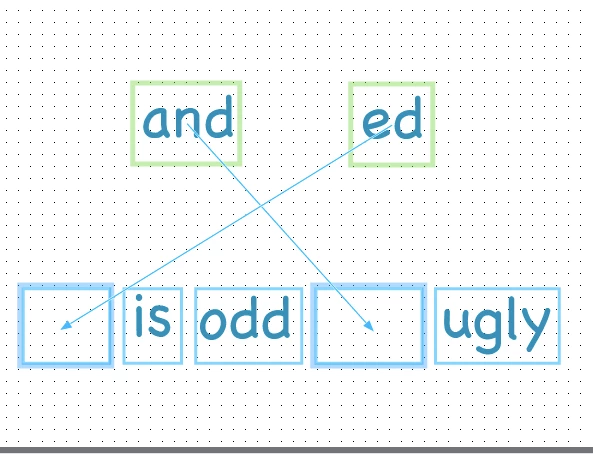
I want them to drag 'ed' & 'and' and get a snap-in sound as they settle in. I've gotten this to work. But when they drag the words to an incorrect location, I want an alert to sound, letting them know it's wrong, and don't want the box to accept the word.

It happens in Pooja's video, but she doesn't show how. I'm tearing my hair out. Soon it will get ugly around here.

This topic has been closed for replies.
Correct answer Lilybiri

I'm trying to understand it, reading more on advanced actions, and trying to somehow translate correct and incorrect text containers (from your post) into an audio setting.

Pooja's video (Drag and Drop Interaction with Audio Feedback in Adobe Captivate 7)  just made it seem so simple and natural. How did she make those 'nope, wrong!' sounds happen, I wonder?

I think this is beyond what I'm capable of at this point. I guess I need to stick with extremely basic interactions until I can learn and absorb more, which takes time, which I'm running out of.

Thanks, and I'll keep trying!


Sorry for that, I'm always using advanced actions and sometimes forget (late in the evening) that not everyone is acquainted with them.

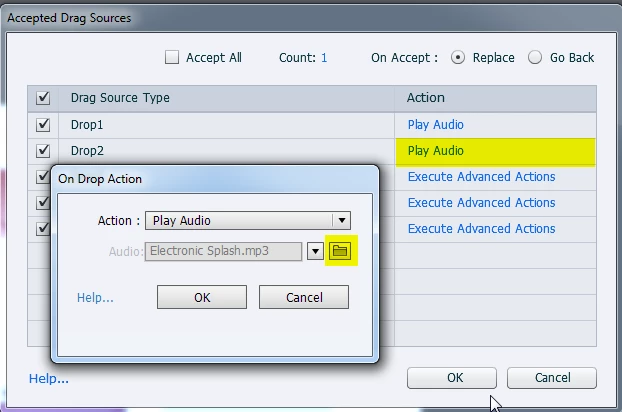
If you only want to play an audio clip when an object is dragged, and don't need a caption to appear or are happy with an unique Falure caption (you can check that one again that), you can replace the Execute Advanced Action command in the screenshot of the other thread by 'Play Audio ...'

I used here an audio clip, available with Captivate in the Gallery\Sounds

Lilybiri

PS: Since CP6 I'm using the word 'container' instead of caption because text can be inserted not only in text captions but also in shapes (my favourite)

1 reply

dowbright
dowbrightAuthor
Known Participant
September 28, 2013

Ahhh. In the Drop Target Accept Box--

UNselect "accept all." Halfway there, at least...

Lilybiri
Legend
September 28, 2013

Maybe have a look at the answer I gave to Jay:

http://forums.adobe.com/message/5721699#5721699

You can also add 'Play audio' in the advanced action, and have a different audio for each drag action... I mentioned also to uncheck Accept All.

Lilybiri

PS Maybe I should retake blogging....

dowbright
dowbrightAuthor
Known Participant
September 28, 2013

If you do, I want to be the first to know!