


Known Participant
July 2, 2021
Answered

Drag & Drop multiple items into two boxes

  • July 2, 2021
  • 2 replies
  • 1328 views

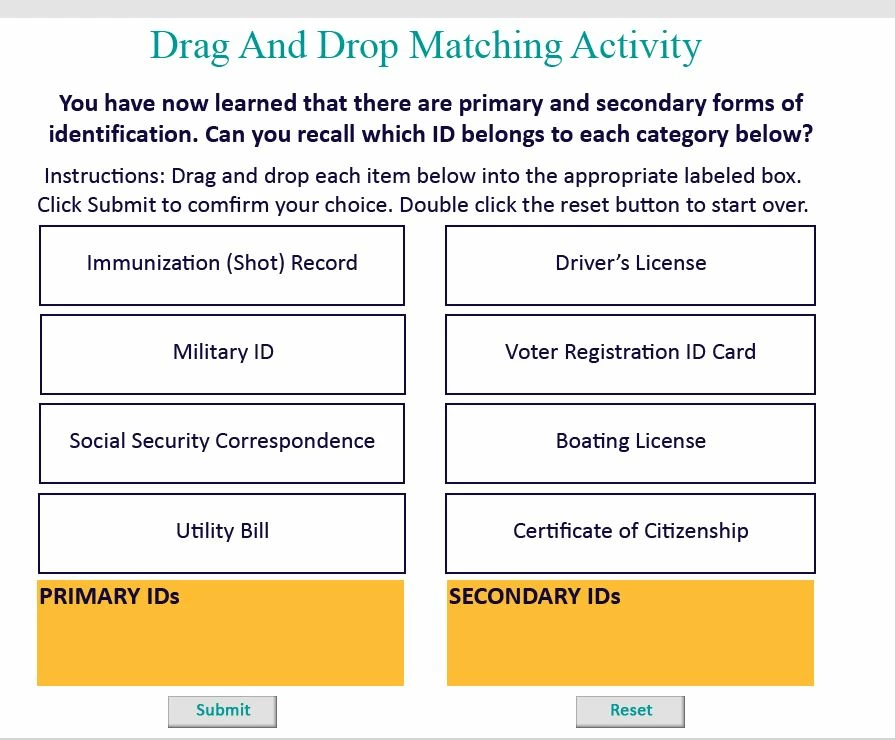
Hi, everyone, and Happy Fourth of July!  I am creating a Drag and Drop activity using Paul Wilson's tutorial titled Drag & Drop with multiple correct answers. It is working fine, except I wanted 4 answers to go into one box and 4 answers to go into another box. If all four are in the proper two boxes then the answer is correct. Is this possible?

 

    This topic has been closed for replies.
    Correct answer Paul Wilson CTDP

    Hey, I think this might help you out...

    https://vimeo.com/570505176


    2 replies

    Lilybiri
    Legend
    July 3, 2021

    Yes, this is possible and you can find a lot of tutorials (look at the eLearning community) about the setup. Most important is to configure the Snapping part for each of the Drop targets (you have 2): how do you want to have the drag sources to appear when they are dropped in the correct target? I see that you require a 'double-click' for the Reset button, which is not necessary, a simple click is sufficient. Do you want to have this D&D exercise to be scored or is it just a Knowledge Check slide?  How many attempts? 

    Have a look at the embedded Captivate example in this blog post, where I use two drop targets as well. It has been enhanced by using the object actions:

    http://blog.lilybiri.com/drag-and-drop-actions

    I have more blogs about D&D. However, here is a tutorial about the available InBuilt states for D&D objects, which you possibly ignore. They can enhance your slide a lot:

    Built in States for Drag&Drop objects - eLearning (adobe.com)

    This one was posted in the eLearning community. You can visit that portal from within Captivate, use the same Adobe ID you use here.


    SlimahIDAuthor
    Known Participant
    July 6, 2021

    Good afternoon @Lilybiri, I now have the drop sources ready to accept all four objects by changing it to Tile and decreased the size of the drag source to appear as 50%. I tested it and they all fit now.

    • I am happy you noticed the double click on the reset button because I was trying to figure out how to stop that and ended up putting instructions on the incorrect message for them to double click. So, is there a way to remove it?
    • Do you want to have this D&D exercise to be scored or is it just a Knowledge Check slide? So far I have been keeping them as Knowledge Check slides because they are going to take a physical post-test at the end of the course. However, now that you ask, I should still keep the score of their submitted answers, huh, so we can assess the learning and or changes we may need to make to the content?
    • How many attempts? I have it set to 4 attempts (Only because I created a correct and incorrect statement for them to read for encouragement purposes) What do you think of this? 
    Paul Wilson CTDP
    Community Expert
    Community Expert
    July 6, 2021
    Glad I was able to help.
    Paul Wilson, CTDP
    Paul Wilson CTDP
    Community Expert
    Paul Wilson CTDPCommunity ExpertCorrect answer
    Community Expert
    July 3, 2021

    Hey, I think this might help you out...

    https://vimeo.com/570505176


    Paul Wilson, CTDP
    SlimahIDAuthor
    Known Participant
    July 6, 2021

    Good morning Paul, and wow, I appreciate your help in creating a video for this issue!!!!!!

    So, I just followed along and completed the steps. Setting the position to tile and the size to 50% fantastic solution. Also, after watching the video, I realized that it was rejecting my 4 boxes because the drop sources I still had the count set for one, but now I changed it to for each drop source.


    So, thanks to you, that's all working now, and with the tile resize to 50%, I can fit all of them in one box!