
Inspiring
March 30, 2016
Answered

Drop Shadows on Shapes: unexpected results on HTML5 output

  • March 30, 2016
  • 2 replies
  • 955 views

Are drop shadows known to course issues with HTML5 output?

It seems that when putting an outer drop shadow on a SmartShape with stroke and 100% opacity fill, two shadows are generated; one for the fill and one for the stroke, in which the stroke shadow comes actually on top of the shape rather than below it (or somehow shines through. Doesn't happen if there's no stroke. Doesn't happen on other objects; e.g. Highlight Boxes.

Is there any way to change this behaviour for HTML5 to match Flash output?

Edit Mode:
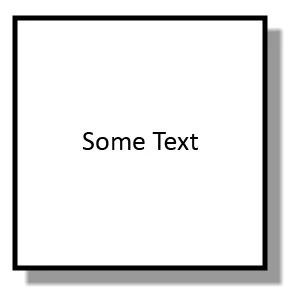
Flash Output:
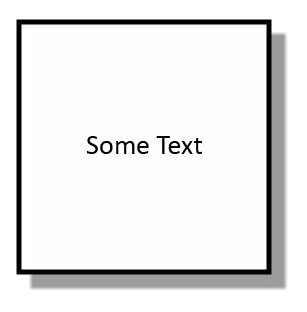
HTML5 Output:
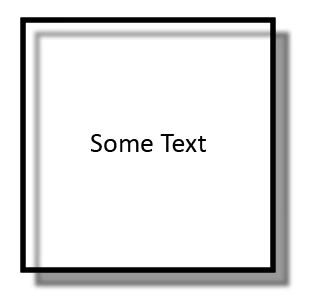
    This topic has been closed for replies.
    Correct answer Cozmicone

    Checked it out and it's a bug. You can submit a bug report to http://www.adobe.com/products/wishform.html

    The only way I can see around it would be to remove the stroke, duplicate the object so it's directly above the old object, then set the fill to 0%, re-add the stroke, and remove the drop shadow. It's not ideal, but if you need to use the drop shadow with an object that has a stroke, this is the only way I can see to output the file as HTML5 without the drop shadow appearing inside the shape.

    2 replies

    doug_greiner
    Participant
    October 12, 2016

    Is there a workaround, possibly by editing the CSS in the output files?

    RodWard
    Community Expert
    Community Expert
    October 12, 2016

    If you are interested in enhancing performance of your Captivate HTML5 output on mobile devices DON'T use drop shadows at all on any object, and minimise the use of gradient colours. These might look cool but they use up a lot more resources and mobile devices are usually a bit stretched when it comes to RAM and CPU. 

    Use a 'flat' design instead. (Why do you think most recent OS designs on mobiles are now flat and don't have gradients?)

    CozmiconeCorrect answer
    Inspiring
    April 5, 2016

    Checked it out and it's a bug. You can submit a bug report to http://www.adobe.com/products/wishform.html

    The only way I can see around it would be to remove the stroke, duplicate the object so it's directly above the old object, then set the fill to 0%, re-add the stroke, and remove the drop shadow. It's not ideal, but if you need to use the drop shadow with an object that has a stroke, this is the only way I can see to output the file as HTML5 without the drop shadow appearing inside the shape.

    GaanfAuthor
    Inspiring
    April 5, 2016

    Thanks, submitted it as a bug on the Feature Request/Bug Report Form.