Participant
January 4, 2011
Answered

Editing answer input font size in quiz

  • January 4, 2011
  • 1 reply
  • 1759 views

Hello,

I was wondering if someone can help with the following dilemma.

Is it possible to edit the font size that displays in the user answer input area during a quiz? Take a look at the screenshot below:
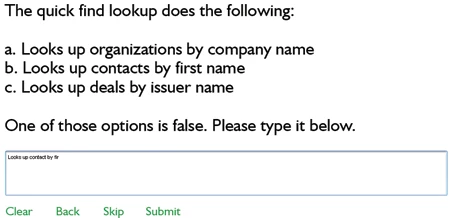
Notice how small the font inside the answer input box looks compared to everything else. I tried changing the object style preference for Quiz Answers/FIB Text but that didn't work and I'm not sure what else to try.

Using Captive 5 Windows XP.

Any tips would be greatly appreciated.

Thank you,

Christine

This topic has been closed for replies.
Correct answer

Hi,

You're right!

We have a widget for this.

Please download the widget from here:

http://www.adobe.com/cfusion/exchange/index.cfm?event=extensionDetail&loc=en_us&extid=1845029

You could follow the instructions given in this page to get the widget working.

Thanks,

Sushma

1 reply

January 5, 2011

Hello Christine,

I presume you are using a Short Answer type question here.

If so, Currently, we do not have an option to edit the Font size for the answer text to be entered.

We have a request to enable this action and are working on it.

Thanks,

Sushma

RodWard
Community Expert
Community Expert
January 5, 2011

Didn't someone create a widget that enabled adjustment of the text in these short answer questions?

I thought I remembered seeing that somewhere.

Correct answer
January 5, 2011

Hi,

You're right!

We have a widget for this.

Please download the widget from here:

http://www.adobe.com/cfusion/exchange/index.cfm?event=extensionDetail&loc=en_us&extid=1845029

You could follow the instructions given in this page to get the widget working.

Thanks,

Sushma