Known Participant
February 15, 2013
Answered

Editing Submit All "Return to Quiz" button caption

  • February 15, 2013
  • 12 replies
  • 2772 views

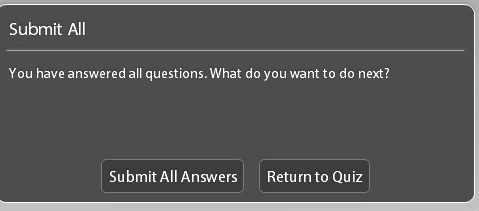
Can anyone point me in the right direction? I need to change the Submit All window's "Return to Quiz" button to "Return to Exam" but don't see where I can do it. Any suggestions?

This topic has been closed for replies.
Correct answer Carl Lauer

To all posters who have been looking for ways to edit the popup text, I just discovered that in CP2017 the popu text:-

  1. is editable under Quiz>Quiz preferences>Settings>”Submit All Messages” button (greyed out, if the “Submit All” checkbox has not been ticked).
  2. can formatted in HTML
  3. can be written even in Arabic, with correct RTL flow

I hope this helps.

Moderator: this is only valid for version 2017!

12 replies

Carl LauerCorrect answer
Inspiring
August 20, 2017

To all posters who have been looking for ways to edit the popup text, I just discovered that in CP2017 the popu text:-

  1. is editable under Quiz>Quiz preferences>Settings>”Submit All Messages” button (greyed out, if the “Submit All” checkbox has not been ticked).
  2. can formatted in HTML
  3. can be written even in Arabic, with correct RTL flow

I hope this helps.

Moderator: this is only valid for version 2017!

Lilybiri
Legend
August 20, 2017

Great find, thanks for reporting this.

BTW: this is a NEW feature in Captivate 2017 which I didn't see mentioned anywhere. It is not available in previous versions (not even latest 9.0.2.437). My bad, overlooked this enhancement.

Inspiring
August 13, 2017

Hello,

This question has now been open for 4.5 years... is there any sign from Adobe that the "Submit all" pop-up will become editable (prerferably also with the ability to add new text captions into which variables can be inserted)? Adobe, allow me a rhetoric question: How can the standard "Submit all" feature be implemented in a professional way (incl. in different languages) without making this popup editable?

Any updates on this post would be much appreciated.

Participant
September 3, 2014

Hello,

I have solution for you.

Close Adobe Captivate if you have it opened.

Go to: Adobe Captivate/en-US/

Back up files strings.txt and strings.zdct.

Open strings.txt.


Find text you want to change. Save the file. Make copy of it and rename it to strings.zdct which is placed in same folder.

This solution works just for projects made from blank after doing this tutorial. It doesn´t work for your old projects sadly, even when you resave them.

Here is test result with special characters working.

Known Participant
September 10, 2014

I have a similiar issue in that I need to remove the "Review Quiz" option all together to avoid the bug that erases the answers (but leaves the radio buttons selected).  Because once a user reviews the answers, even if they make no changes, the radio buttons are shown as selected, however the answers are no longer recorded.   The user is told they haven't answered any questions.  I need to remove the "Review Quiz" option all together.

I have tried making this option unavailable via Quiz Preferences > Settings by unselecting, "Allow User to Review the Quiz," however this does not work. The user is still given the option to review the quiz when Submit All Answers is used. 

Participating Frequently
July 10, 2014

Are there any new answers for this post?

Lilybiri
Legend
July 10, 2014

Nothing changed, not even in CP8.

Lilybiri
Legend
February 16, 2013

Hello and welcome to the forum,

But I'm sorry, cannot help you with this question. The label for 'Return to Quiz' is not available in the Quiz, Default Labels setting at all. Same for the dialog box itself that uses the style of Runtime Dialog, that can be configured a lot except for the font size of the message. Looking forward to having someone of the staff popping in to explain a possible workaround, but bit sceptical.

Lilybiri

Participant
March 9, 2013

My clients want translated elearning project for testing their clients, and we need very much pssibility translate "Submit All Answers" and return to Quiz for cleints.

Its very important solve it, becouse we cannot finishing our worki project!!!

Mgr. M. Niederhafner

Lilybiri
Legend
March 9, 2013

Submit All Answers is in the Default labels, under Quiz Preferences. Not 'Return to Quiz' as I told you,

Lilybiri