
lindam18438430
Participant
April 11, 2017
Question

eLearning Brothers Assets/Cap 9/Windows 10

  • April 11, 2017
  • 1 reply
  • 192 views

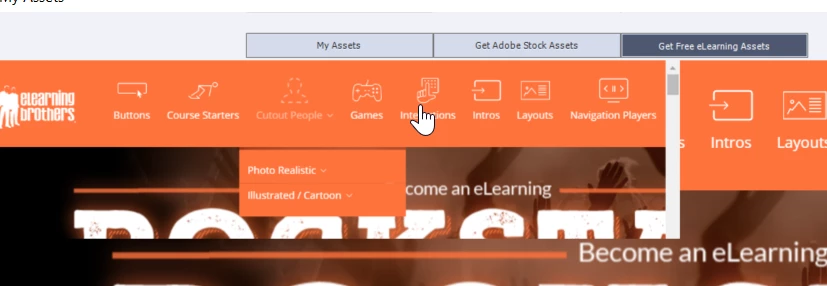
I am finally able to get to the eLearning Brothers assets, however when I see a mini-wondow on top of a large window. Trying to select any of the items doesn't allow me to then select Captivate, to see the assets. You will see the little window and then the bigger window. So when you want to select something such as Layouts, you cannot. This example shows the mini window to the right and then a larger window to the left. Does anyone have this issue or know what to do here?
    This topic has been closed for replies.

    1 reply

    Paul Wilson CTDP
    Community Expert
    Community Expert
    April 11, 2017

    I thought it might have something to do with display scaling on a high-density display but that didn't change anything on my machine. 


    You might try resetting your preferences and see if that helps. Keep in mind you will lose all customization of your preferences, layout and so on. Exit from Captivate. Navigate to C:\Program Files\Adobe\Adobe Captivate 9 x64\utils and double click on the CleanPreferencesWin file.


    If that doesn't work check with CaptivateHelp@adobe.com or possibly check with the eLearning Bros http://elearningbrothers.com (the providers of these assets).

    Paul Wilson, CTDP