Known Participant
September 16, 2009
Answered

email settings?

  • September 16, 2009
  • 1 reply
  • 1638 views

Hello -

I am using Captivate version 4, Windows Vista and Thunderbird 2.0.

I am trying to send a crev file via email using the Publish process. I wish to do it this way so that it will send the viewer along with the crev file.

My default mail used to be Outlook, but now is Thunderbird.  Outlook is no longer installed at all, and I have taken all the necessary steps to ensure that Thunderbird is my default.

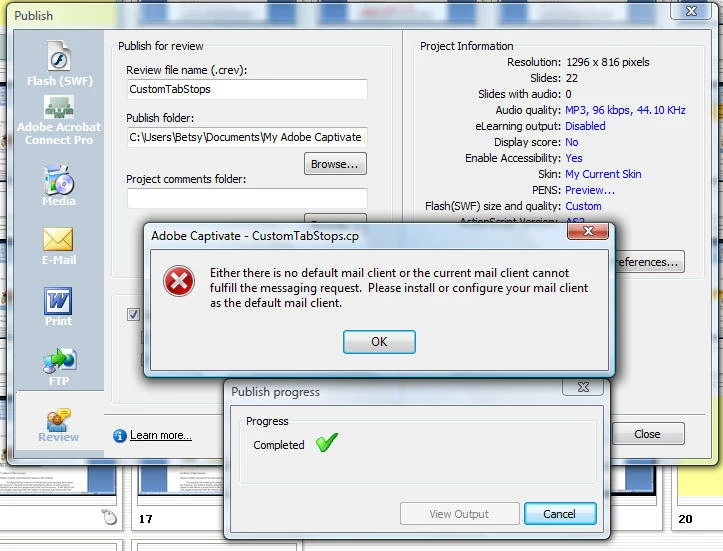
When I try to publish and send the crev and viewer, I get the message inserted below. As explained above, I do have a default client. So what might it be about Thunderbird that cannot handle this task?

Thanks in advance for you help-

Betsy
    This topic has been closed for replies.
    Correct answer www_cpguru_com

    Hello again Michael=

    Thank you for following up and continuing to help me with these issues.

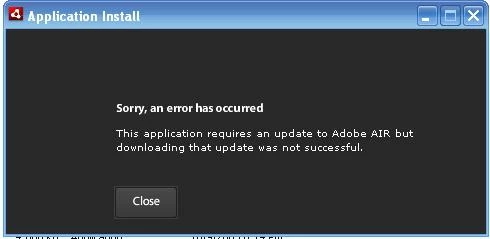
    I have two laptops, one with Vista and one with XP. I have Captivate 4 installed on the one with Vista. I downloaded the reviewer to that one and it seems to work very well.  So I decided to try it on my XP laptop before I invited any colleagues to use it on their computers. I am unable to successfully download it to my XP laptop. I get the following error (see below) each time I try, even though I am downloading the most current reviewer directly from the website. I find this error message to be not very helpful at all. Do you have any ideas?

    Thanks again for your patience and help-

    Betsy


    Hi Betsy,

    Never seen that before. Perhaps try and install the latest version of Air on your PC first. You can get that from this link: http://get.adobe.com/air/

    Then try and install the reviewer and see if that works.

    /Michael


    Visit my Captivate blog with tips & tricks, tutorials and Widgets.

    1 reply

    Inspiring
    September 16, 2009

    Perhaps it's not your Thunderbird that is failing but instead Captivate that doesn't register Thunderbird as a correct mail client. I think that is your issue to be honest.

    /Michael


    Visit my Captivate blog with tips & tricks, tutorials and Widgets.

    Captiv8r
    Legend
    September 16, 2009

    Hi there

    In addition to what Michael kindly offered, I'll add this:

    Your screen shot seems to infer you are using Windows Vista or maybe Windows 7. So hopefully what I'm about to suggest will be the same for those OS'. I'm using XP Professional and I had a similar issue to yours.

    In my case, I would try the publish action and instead of seeing the message, Windows went through gyrations and attempted to configure Outlook. This angered me a bit and I thought perhaps Captivate was somehow hard coded to look for Outlook. My default E-Mail client was Thunderbird. If I opened a Web Page and it had a send E-Mail (mailto:) link, I clicked and Thunderbird opened. So I was confused.

    Then a colleague suggested that I look in my Windows Control panel. After opening the control panel and looking at the Internet options, lo and behold I saw Outlook was configured there. That seemed to fly in the face of why clicking mailto links opened Thunderbird, but after I changed it there it began working as I wanted. So hopefully it will work for you as well.

    Cheers... Rick

    Helpful and Handy Links

    Captivate Wish Form/Bug Reporting Form

    Adobe Certified Captivate Training

    SorcerStone Blog

    Captivate eBooks

    bwlkerAuthor
    Known Participant
    September 16, 2009

    Hello Michael and Rick-

    Yes, Michael, I think you are correct.  I have gone over every preference setting in Captivate that I can find, but I see no place to identify an email client. What have I missed?

    Rick - my experience has been exactly like yours. I do not like Outlook and so never had it set up on this laptop, but Captivate seemed to always default to it. So I completely uninstalled it, and then made sure that TBird was my default client. I have taken the Control Panel steps you suggested already, which is good advice for setting the default program.  However this has not changed Captivate's behavior.

    So instead of asking what TBird cannot manage, perhaps I should be asking how to get Captivate to recognize my default email client. What preference is there that I am missing?

    Thanks to everyone for your willingness to help!

    Betsy