Participant
November 8, 2021
Answered

Embed LikedIn Learning Video

  • November 8, 2021
  • 1 reply
  • 265 views

How can I embed a LinkedIn Learning video in a Captivate course? I have an embed iframe code set from the video, but I don't know where to put it in Captivate.

    This topic has been closed for replies.
    Correct answer bill_theVoice

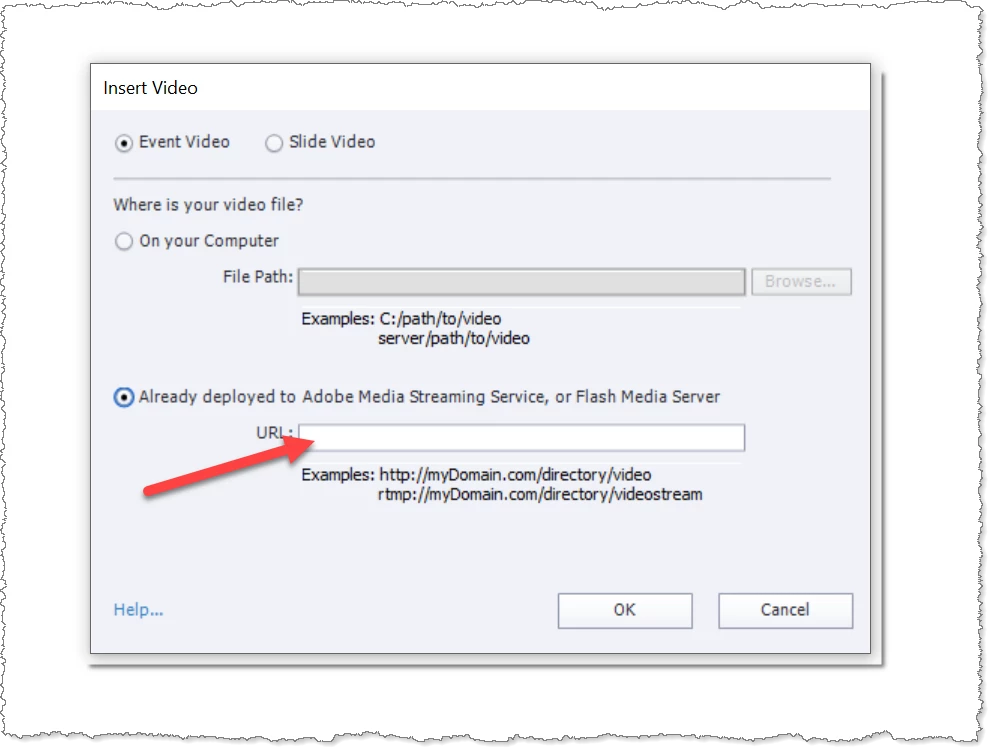
    Have you tried Video > Insert Video and then selecting the lower option on the dialog?

    One thing you may find though is that LinkedIn may block you from playing their content through your own LMS domain.  So if the above method does not work, that could be the reason.


    Thank you for your suggestions. 

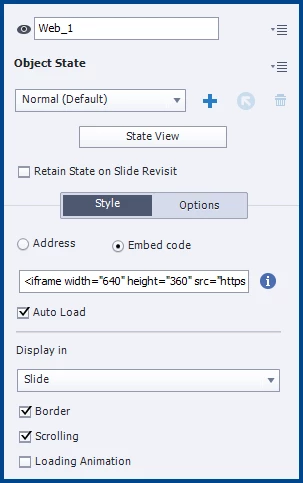
    We were able to make it work by using a web object and selecting Embed code.


    1 reply

    Lilybiri
    Legend
    November 8, 2021

    Hmmm... what about the rules for LinkedIn Learning. Normally you can watch those videos only as Premium member, correct?

    You can point to the URL of the video, but I wonder what the result will be due to the protection which is for sure in place.

    Participant
    November 8, 2021

    Yes, that's a good point about needing to be a Premium member. We have an Enterprise membership with LinkedIn Learning, and the embed code is therefore available to us for internal training purposes. We are able to use the embed code in a Rise course, but I'm trying to determine if we can use it in a Captivate course as well. 

    RodWard
    Community Expert
    Community Expert
    November 9, 2021

    Have you tried Video > Insert Video and then selecting the lower option on the dialog?

    One thing you may find though is that LinkedIn may block you from playing their content through your own LMS domain.  So if the above method does not work, that could be the reason.