ylez
Participating Frequently
September 3, 2015
Question

embedded fonts

  • September 3, 2015
  • 2 replies
  • 1105 views

Hello I've been having this weird issue. I want to use a couple of fonts on my modules but they are not rendering well. I've tried the suggestions found on this post

How do I embed fonts into Captivate projects?

especially the reply by Rares Neamtiu 23-Apr-2015 01:30 (in response to Charinos), but we keep seeing the fonts replaced. I tried to do two things

1. I attempted to import the fonts directly from google library using
     @1552174 url(http://fonts.googleapis.com/css?family=PT+Sans:400,700,400italic,700italic);

when that didn't work up, i tried solution 2, as proposed by Rares

2. Downloaded the fonts, converted them and used the css like...
   @1552174 url("../font/pt_sans/stylesheet.css");

and checked both the css file and the CPM.js

reuploaded the courses and Voila....nothing worked, so I'm stuck.

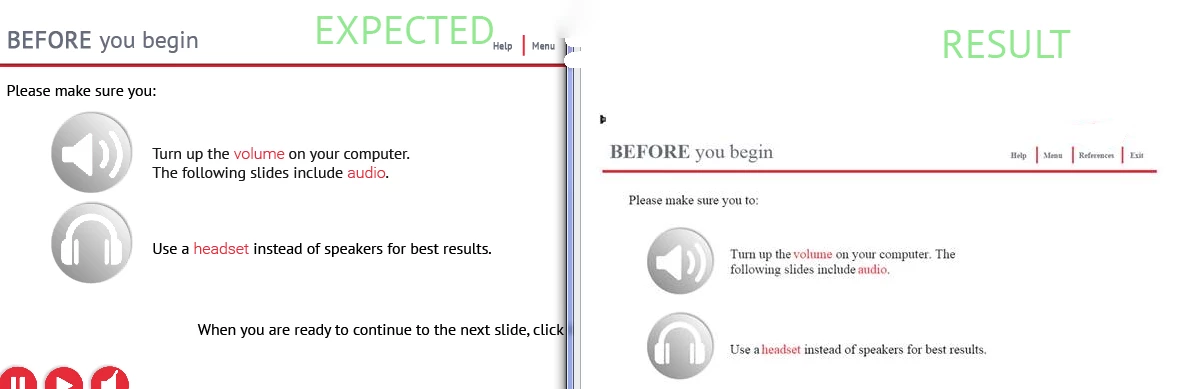
below is the Expected result in Captivate on the left and the actual screen in chrome/IE on the right.

Thanks.
This topic has been closed for replies.

2 replies

AchieveOnlineMedia
Known Participant
September 11, 2015

Dont know if this will be any help but this is my workaround. If you import your text into captivate 9 from illustrator as an svg you can have alot more design control over the look and feel of your project. I was able to use typekit webfonts and export out as html for an ipad project with good results, trick is to convert text to outlines on export from illustrator.

windscorpion
Inspiring
September 4, 2015

This is what i do (for publishing as HTML5 (i use Cp8))

In the index_SCORM.html file add your web font reference in the head part of the html

e.g. i use the web font Actor for headings so i put

<script src="//use.edgefonts.net/actor.js"></script>

Next step is a bit trickier and is best done with a multi search and replace in a friendly text editor

open assets/js/CPM.js

It is a machine generated mass of code, do a search and replace on the font css to put your web font in

e.g. search for 'Arial' and replace with 'Actor','Arial'

I automate all the above using a Perl script but you can do it manually using a text editor fairly easily.

AchieveOnlineMedia
Known Participant
September 11, 2015

Does any1 know where i might find a video tutorial for this? Ive spent the last 2 hours trying to get it to work using various methods. Would be very grateful if any1 can help in any way.