Participant
May 23, 2017
Question

embedded mp4 videos won't play through LMS

  • May 23, 2017
  • 2 replies
  • 1870 views

I have a Captivate project with embedded videos. When I publish the files the videos play through either the .html or the .swf files. Then, when client put the files in his LMS, the videos don't play. he has received a error MSG that 

Error:resource file does not exist 
file: imsmanifest.xml
Path: 1.mp4 (1=Video name.mp4)
severity:  warning 
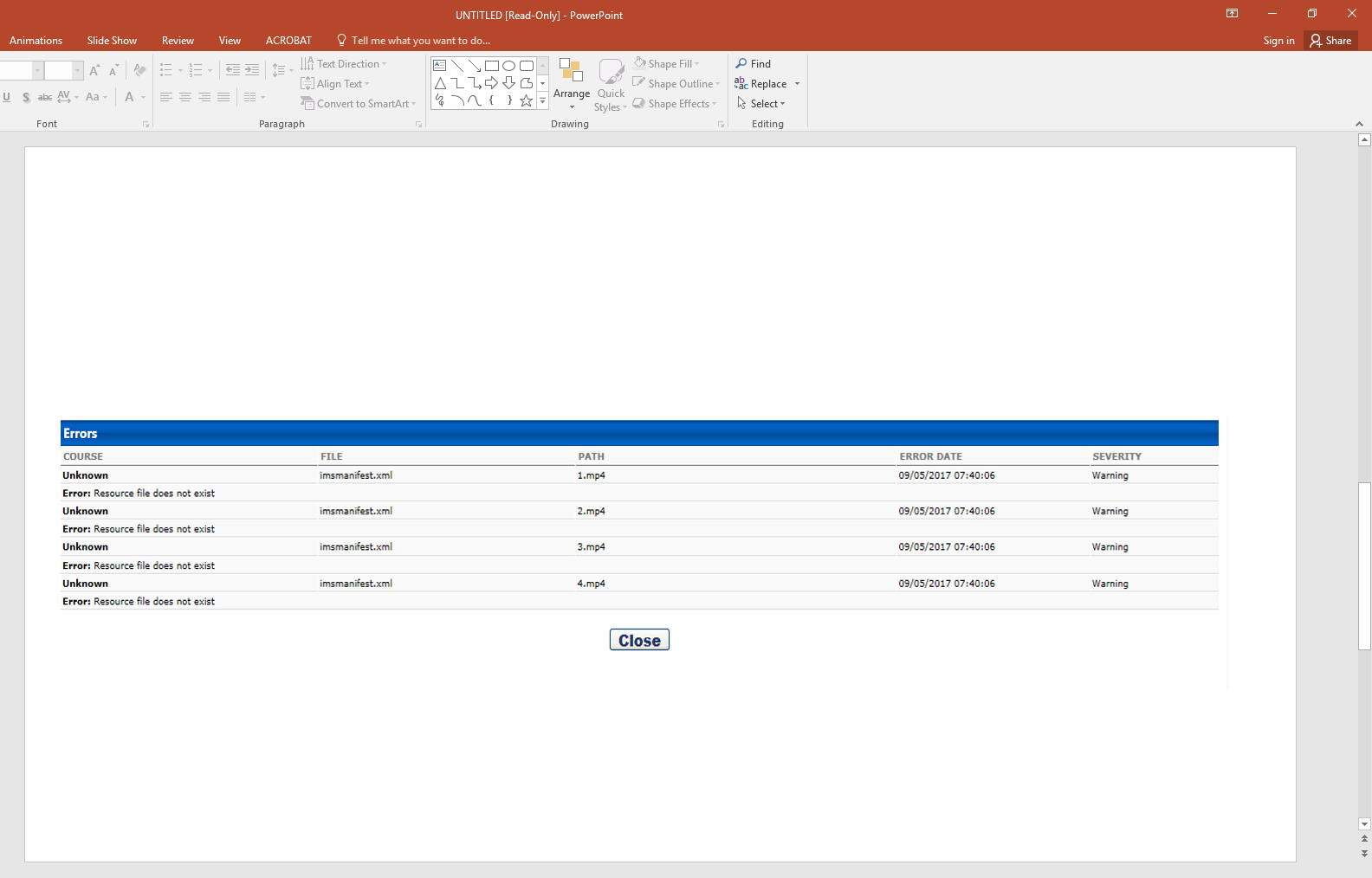
Screenshot (8)
May you resolve this?

    This topic has been closed for replies.

    2 replies

    micr30581861
    Participant
    June 14, 2017

    I have the same thing happening for a project which includes video assets. I think when Captivate exports the SCORM, the video files are being housed in a different folder than what is referenced in the imsmanifest. If I unzip the SCORM, I find my mp4 files in a 'vr' folder. But in the imsmanifest the mp4 is referenced as being located in the root folder. I have not tried changing the manifest (to include 'vr/' before the mp4 file name) or moving the file to the root folder within the SCORM, but those are my next steps. Either way, it seems like a Captivate 2017 SCORM export problem specific to video files.

    zeeshan hussain
    Adobe Employee
    Adobe Employee
    June 15, 2017

    Hi,

    Could you please drop a mail to CaptivateHelp@adobe.com by mentioning this thread in the subject line and also let us know the LMS you are using to host your content.

    Also please share with us, your project and its published HTML5 output you are hosting  using drop box or google drive.

    We would like to suggest you to try hosting the published html5 output of your project on Scorm cloud and confirm if the issue exists there as well. If issue is specific to your LMS, we might need a test account to debug this further.

    Regards,

    Zeeshan

    Jefferbob12055564
    Inspiring
    December 12, 2017

    Seeing the same behavior in Captivate 9.0.2.437. Responding here for any updates. Already bug reported.

    RodWard
    Community Expert
    Community Expert
    May 23, 2017

    Are video MP4 files enabled to play from that LMS server?  Check with the LMS Admin.  And if you happen to be publishing HTML5 courses from Captivate 9 to the same LMS, check that the LMS Admin has enabled JSON files too.  That won't be the cause of your current issue, but it might save you another one in the near future.