
ruthg84
Known Participant
August 16, 2018
Question

Embedded videos from Vimeo increasing file size dramatically

  • August 16, 2018
  • 1 reply
  • 397 views

Hi,

I'm on Captivate 2017 (10.0.0.228).

I have a bunch of videos on Vimeo that I want to embed into my course. I understand that embedding them as web objects wouldn't increase the file size so much but they have jumped from about 10Mb to 900Mb in some cases.

I haven't inserted the videos, I've only inserted the embed codes in iFrames.


Can anyone explain why this has affected the file size so much?

Here's a screenshot of the properties panel when one of the embedded videos is selected:
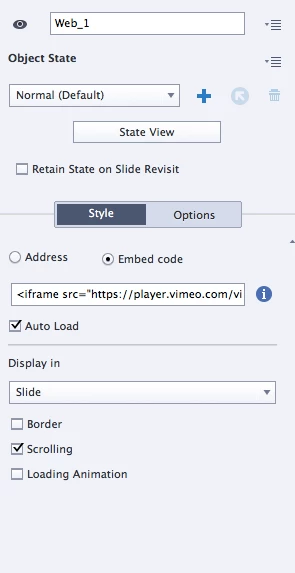
Is it normal that a web object would contribute this much to the file size? And if so, is there a better way of doing it?

Thanks!

This topic has been closed for replies.

1 reply

Paul Wilson CTDP
Community Expert
Community Expert
August 16, 2018

It shouldn't behave this way. Take a look at your library panel. This is where all the objects that are part of your Adobe Captivate project are stored. Look for something particularly large in size. Perhaps it's unrelated to the Vimeo embed. Also when the course is published, unzip it and see if there are any really large files within the folder structure of your published project. That might give you a clue as what it might be.

Paul Wilson, CTDP
ruthg84
ruthg84Author
Known Participant
August 17, 2018

Thank you! Yes, this was it - there was a sneaky old video file hanging around in the library from the first time I tried to embed them!