
Known Participant
November 6, 2015
Question

Embedding a pdf file that can be opened within a captivate presentation

  • November 6, 2015
  • 2 replies
  • 1535 views

I'm developing a series of modules that include button links to resources. Currently the links go to websites or online pdf files. This works well for websites but, since the same pdfs are used throughout the project, this method forces users to repeatedly download the same pdf's. It would be better if the pdfs could be embedded in the module rather than accessed via a web address.

Can I embed the pdf files in the presentation and use buttons with Action links to open the pdfs?

I tried importing the pdfs into Captivate and modifying the button Actions by replacing the original URL address with the name of the imported file. I used the NEW radio button in the pulldown menu next the URL entry space:
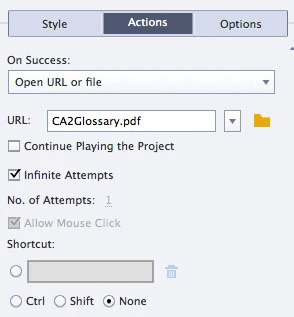
When I preview the project (Using From this Slide) the button doesn't link to the imported pdfs.

I imported the pdf files into the Library and they were placed in the Web folder. Should the imported pdfs be somewhere else?

I appreciate any advice users can provide.

Dan

This topic has been closed for replies.

2 replies

BDuckWorks
Inspiring
November 9, 2015

If you're opening the PDFs in a browser window, the browser would store the PDF in a local cache. So, you should see minimal re-downloading of the same file, unless the URL has changed from the last link.


Are you trying to tailor the links in Cp to specific pages, named sections, or zoom regions within the PDF?

videodan7Author
Known Participant
November 9, 2015

Thanks for your response.

The original plan was to link to uploaded pdfs and indicate on the linking button created in captivate where, within the pdf, to find relevant information. Now we are considering creating separate pdf files that contain only the information related to each slide. But it's how pdfs open that is presenting a problem.

When I test this on my iMac, the file is downloaded to my downloads folder instead of opening in a separate window. Then I have to navigate to that folder to access the pdf. This, of course, is cumbersome and not very user friendly. That's why I was hoping to be able to embed pdfs within the uploaded captivate output file.

I'm getting the URL for the pdf from my client. I imagine the manner or location in which they are uploading the pdf may be causing the forced download to happen since I often open pdfs from websites without the need to download the file into my download folder. I'm not knowledgeable enough about website design to know whether I'm correct about why this is happening or how to advise my client to change pdf uploads to allow pdfs to open directly from a link.

I think linking would be fine if I could avoid users having to manually retrieve the files. I just want the pdf files to open in the same way links to websites can be easily opened and closed without disrupting the learning experience.

Dan

Captiv8r
Legend
November 9, 2015

Hello again

Note that I'm no PDF guru. I'm sure there are many around but are likely hanging out in the PDF forums.

But having said that, it's my own understanding that how a PDF is opened and dealt with may vary from machine to machine and is dependent upon how the user of that particular operating system has elected to handle things.

For example, I believe that some users may have configured their PCs to open the PDF in the web browser, while others may have configured the PC so it just saves the PDF to a download location. And as an author, you don't really have any influence over that particular behavior.

I'd love it if someone were able to confirm or deny my understanding. Hopefully such a person will pop in to advise us.


Cheers... Rick

Captiv8r
Legend
November 6, 2015

Sorry, no way to embed a PDF as you are hoping.

The best you can do is ensure the PDF exists in a known location and link to it from Captivate.

Cheers... Rick