Known Participant
February 27, 2024
Answered

Empty variables (Captivate 2019)

  • February 27, 2024
  • 2 replies
  • 2069 views

Hello,

I'm quite lost with this so maybe could show me the good path.


Firstly, to prevent blocks of text from being pixelated, you can insert an empty variable in the block, which forces the block to render dynamically. This works very well for export, but as soon as I publish to my Moodle (through a SCORM package), the empty variable is converted to a '0' in my text block.
Is this just due to the type of export or have I missed some extra 'trick' to make it work?


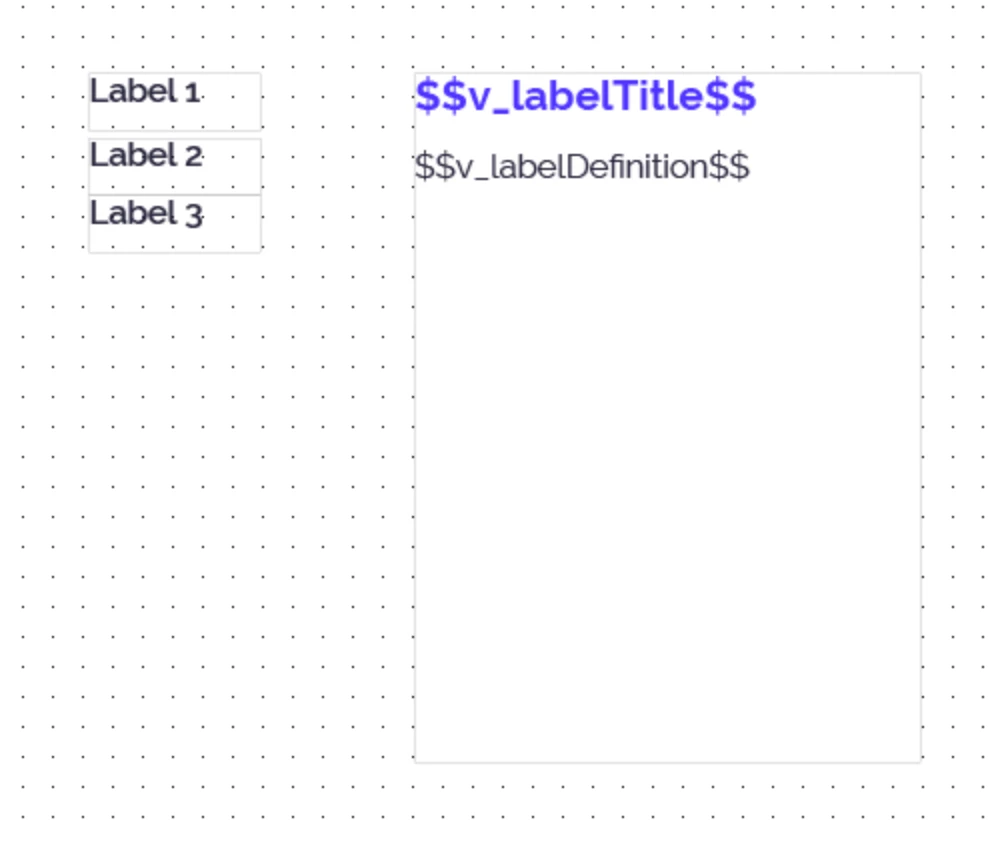
And secondly, I have a slide with lots of definitions to give (a kind of glossary). To keep things simple, I thought I could insert 2 variables (title + definition) in a block of text (see screenshot) and that by clicking on my various label buttons I could assign the 2 variables with a shared action. Once again, the principle works well, but at the start (before selecting the first label) or when I return to the 'empty' state by assigning an empty variable to my 2 variables in the block, it displays "0" again.


Thanks for any help 😉
 

    This topic has been closed for replies.
    Correct answer Lilybiri

    Could I really go overboard and receive the shared action (or any other simplified action, of course) to see if I can reimport it into my project with the empty variable?


    Sorry, went for a short walk because of the sun. Here in Belgium it has been raining for months.

    I cannot send it through this forum. It must definitely be another bug in 11.8 because this worked for me in 11.5.5.

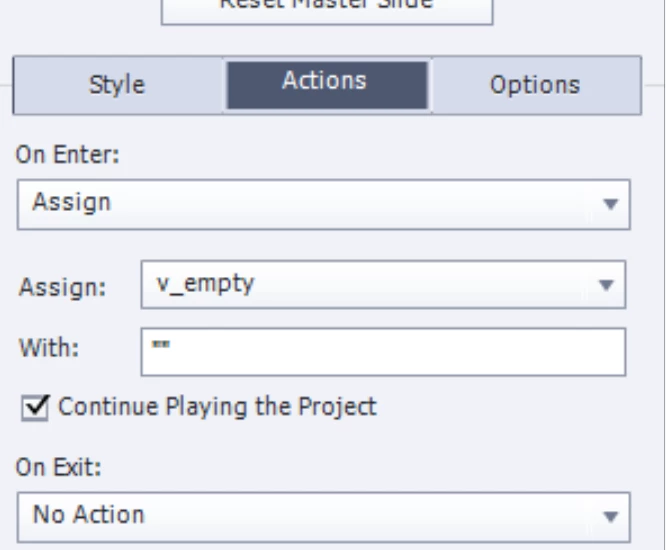
    Can you try this: use the On Enter action of the slide to assign the value "" to the variable:

    You need to do this on the first slide. Since you don't change that value anymore later, it should remain empty. Crossing my fingers that this works, that you don't discover another bug.

    2 replies

    kdmemory
    Inspiring
    February 27, 2024

    Can't you just work with two text blocks (Text captions in Cp 2019), one for titles and one for definitions and use multistates for the different label texts?

    Or, just an idea, maybe your variable concept works when you instead of an empty value (which becomes 0) use the HTML entity:


    which is in HTML a nonbreaking space , practically an empty (text) string. Maybe?

    Lilybiri
    Legend
    February 27, 2024

    @kdmemory Sorry, but the workflow with a nonbreaking space in CP2019 will not work.

    The workflow with a (real) empty variable, which is entered as default value "" makes the text container (shape or outdated caption) dynamic. That is the term which was used in Flash, now Animate: since the variable needs to be evaluated on runtime, the complete text will be rendered on runtime, thus avoiding the blurriness when static text is converted to an image and it had a low font size. This is valid ONLY for non-responsive projects. Both Breakpoint views or Fluid Boxes create responsive projects, where all text is rendered on runtime.

    Sorry because I point to the blogs which offer more details.

    In CP12 all projects are responsive, you don't need this old cheating workflow. I suspect OP didn't define a default value for the 'empty' variable.

    Known Participant
    February 27, 2024

    I'm well on a non-responsive project (great) but once more I'm lacking background knowledge and don't understand / The workflow with a (real) empty variable, which is entered as default value "" / ? How are you creating these "real" empty variables?

    Sorry if this seems obvious but this is my first project.

    Lilybiri
    Legend
    February 27, 2024

    Which exact version of CP2019 do you use? It had 3 main releases and multiple patch releases. You find the full version number under Help, About Captivate.

    I suspect you didn't make it an empty variable.  I 'invented' this workflow over a decade ago, but did write a new post 5 years ago. It may help you, is linked to the fact that in CP2019 a variable has no defined type. If you leave it empty it is assumed to be the number 0. 

    https://blog.lilybiri.com/where-is-null-in-cp2017


    Known Participant
    February 27, 2024

    Hello Lilybiri, thanks for quick response !

    I've already come across your post but I didn't really understand the 'why' behind this rather complicated workflow (compare to the older tutos I found). So, just to make sure I have the right starting point, I understand from your reply above that the empty variable 'trick' did work in older versions of Captivate but that the latest versions (mine is 11.8.2) no longer accept empty variables (and so no 'easy' solution now to do the same kind of things)?


    So, is there another solution for forcing the dynamic rendering of a text block?

    And for my glossary things, I will then go further in your post and maybe have a look on kdmemory possible workflow.