
Inspiring
May 9, 2019
Answered

Encountering an Unexpected Problem

  • May 9, 2019
  • 3 replies
  • 548 views

I was able to publish last week with no problem. Go in on Monday and I get this error every time I attempt to do anything with Adobe Presenter. I am using Presenter version 11.1 and PowerPoint 365. I have uninstalled Presenter and reinstalled it to no avail. Also emailed our Adobe support contact with no answer as of right now.
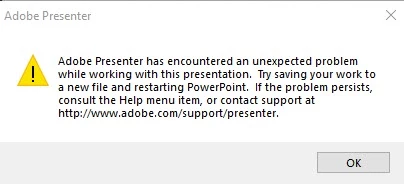
This topic has been closed for replies.
Correct answer kornieme

No, it ended up being a McAfee issue blocking access to the internet. With evertything tied to browsers it wouldn't do anything when I touched anything on the Presenter tab.

3 replies

philipw15367395
Participating Frequently
June 6, 2019

Check the "Zip package" in the output options box when publishing. You can unzip it after publishing and put it in a folder; the files are the same.

I just got the same error and tried enabling/disabling the add-on and restarting PowerPoint to no avail. It would only publish the data and metadata folders but not create the index file and javascript files.

I'm thinking the programmers messed up the initialization routine and aren't resetting some variables properly for publishing. Checking zip package likely restores the initialization of variables - but that's just a guess. (These initialization problems are everywhere; every time I start my car I have to turn my AC up before I can turn the fan down.)

korniemeAuthorCorrect answer
Inspiring
June 6, 2019

No, it ended up being a McAfee issue blocking access to the internet. With evertything tied to browsers it wouldn't do anything when I touched anything on the Presenter tab.

korniemeAuthor
Inspiring
May 9, 2019

By the way https://www.adobe.com/support/presenter is a page that cannot be found, lol. Is there any support for Presenter anymore?