
Known Participant
October 15, 2018
Answered

Entering DOS fields

  • October 15, 2018
  • 2 replies
  • 575 views

I have an interesting situation I'm hoping to get some feedback on from you Captivate experts.

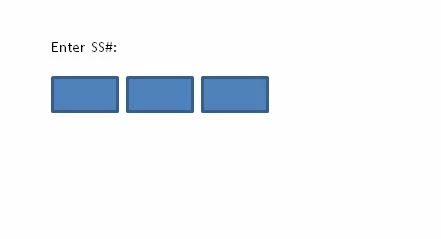
We have a section of training where we need to show staff how to enter things into our DOS system. For security reasons I can't show the actual screen, but I've included an image of what we're trying to accomplish.

Basically staff have to enter information into three boxes. Both SS and date of birth have three separate boxes. The current version of the Captivate training uses multiple text captions and actions to accomplish what we need to. The biggest issue is currently learners have to press the tab key to go to the next box, but in the actual DOS program it automatically advances to the next box.
My questions are:

1. How would you go about building this sort of interaction?

2. Is there a way to have it advance to the next box automatically after user has typed in the previous box?

I've also considered that if it would be better to go with a simulation on this instead of using screen shots and actions.

Thanks!

    This topic has been closed for replies.
    Correct answer TLCMediaDesign

    Sorry, it should be:

    Text_Entry_Box_2_inputField.focus();

    2 replies

    Lilybiri
    Legend
    October 15, 2018

    Of course you can try the JS approach. Personally I would go with a real software simulation, or at least use the approach built in those software simulations. They have each TEB on an individual slide, and the actions On Success and Last Attempt are both set to go to the Next Slide. That will automatically have the next TEB in focus.  Maybe too simple? Up to you.

    Known Participant
    October 15, 2018

    I thought about going this route as well. I'm waiting for access to our software to record a simulation and see how I can edit text boxes to recreate the use of the DOS system.

    TLCMediaDesign
    Inspiring
    October 15, 2018

    If you set up your TEB's to have a character limit or 3, 2, and 4, restrict to only numbers and choose auto submit, then on success execute this JavaScript :

    Text_Entry_Box_2.focus();

    which refers to the next TEB name.

    Known Participant
    October 15, 2018

    Ok, I must be doing something wrong because it's not working.

    I inserted a TEB.

    Options: set to max 2 numbers.

    Actions: On success execute Javascript.

    Script window: entered Text_Entry_Box_2.focus();  (changed the number to match the next TEB)

    Shortcut: None

    But when I preview in the browser I type in the first two numbers and nothing happens.

    TLCMediaDesign
    TLCMediaDesignCorrect answer
    Inspiring
    October 15, 2018

    Sorry, it should be:

    Text_Entry_Box_2_inputField.focus();