Participating Frequently
January 30, 2013
Question

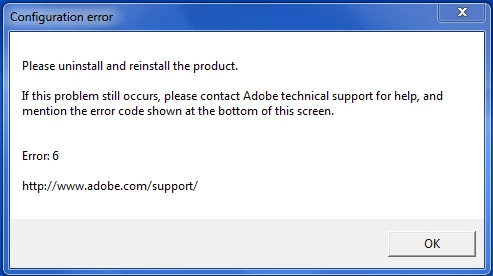
Error 6 on Launch of Captivate 5

  • January 30, 2013
  • 2 replies
  • 598 views

On launch of Captivate 5 I get an Error 6 (same on both machines in our group). I uninstalled and reinstalled with a valid serial number but I still get an Error 6 and the Captivate will not start.

Running on Widows 7 desktop.

Any help would be appreciated.
This topic has been closed for replies.

2 replies

Shekhar_Dhiman
Adobe Employee
Adobe Employee
January 31, 2013

Hi John,

Please accept my apologies. I forgot to mention there. Yes, Rod is right. Please deactivate it from Help > Deactivate before you uninstall it and then try to install it again.

Thanks!

Shekhar

Shekhar_Dhiman
Adobe Employee
Adobe Employee
January 30, 2013

Hi John,

Thanks for reaching Adobe Community Support. Please accept my sincere apologies for the inconvenience.

I request you to perform the below mentioned steps in order to fix this:

* Uninstall all the Adobe Products from your computer through the Control Panel ( For example: Adobe Acrobat, AIR, Flash, etc.).  If you get any error uninstalling any software then let it be there.

* Use the CS5 Cleaner Tool and select "Clean All" http://www.adobe.com/support/contact/cscleanertool.html

* If you have Windows 7 then delete the following folders:

- C:\Program Files (x86)\Adobe\

- C:\Program Files (x86)\Common Files\Adobe

- C:\Users\<myusername>\AppData\Local\Adobe

Reboot the computer and then reinstall.

Hope this helps!

Thanks!

Shekhar

RodWard
Community Expert
Community Expert
January 30, 2013

WHOA THERE!!!

One more thing...BEFORE you go uninstalling all of your Adobe software products, make sure that you FIRST deactivate your Adobe licenses for each one. (The Deactivate option usually found under the Help tab or menu.)  Otherwise when you go to reinstall again you may find that Adobe thinks you're trying to install more licenses than you are allowed.