


Participant
February 24, 2016
Question

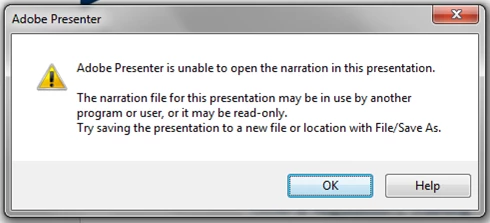
Error message: Unable to open narration in presentation

  • February 24, 2016
  • 4 replies
  • 889 views

When I click Manage, Import, or other things in the ribbon, I get this error message. 
  • First of all, this presentation has no narration in it yet.
  • Secondly, there is no one else signed into it but me.
  • Thirdly, I did try saving to a new location. No go.

I cannot move forward until I get this resolved. No phone tech support available.

Thoughts?

This topic has been closed for replies.

4 replies

Participant
March 21, 2021

I have the same issue

Lilybiri
Legend
March 21, 2021

My apologies,  but this is the wrong forum. I know they moved Presenter questions to the Captivate forum (this is an old thread) which is a bug when Adobe switched to a new forum platform.

There is no dedicated Presenter forum anymore. They told me you should put your question in the Connect forum. There is little chance that you'll get an answer here since the Presenter experts are not here.

This means you will have to clarify your quesstion in a new thread on the Connect forum. I cannot move it the way it has been formulated at this moment.

Sorry for the inconvenience.

Participant
July 2, 2019

Experiencing the same issue, and no narration file has been created for the ppt.

Presenter version = 11

Op System = Win 7

ppt version = MS Professional Plus 2016 (32 bit)

Please provide solution to this issue!

Participant
August 25, 2017

Did your problem get resolved.  I am also have the same problem

zeeshan hussain
Adobe Employee
Adobe Employee
February 24, 2016

Hi,

Sorry to hear about your issue.

Please provide below details-

  • Presenter Version
  • Operating System in use
  • PowerPoint version along with the architecture type (32-bit/64-bit)

Also confirm if this is happening for a specific project or any fresh project you create?

Request you to kindly package your project and share it with me using drop box. (zhussain@adobe.com)

Note: You can package your project using the Package option available on Presenter ribbon.

Thanks,

Zeeshan Hussain

Adobe Presenter Engineering Team

Participant
November 9, 2017

I, too, have been experiencing this issue. I have yet to create narration files for this Ppt.

Presenter version = 11

Op System = Windows 10

PowerPoint version =MS Office Pro Plus 2013 (32 bit}